soft Product List and Ranking from 1832 Manufacturers, Suppliers and Companies | IPROS

Last Updated: Aggregation Period:Sep 09, 2026~Oct 06, 2026
This ranking is based on the number of page views on our site.

soft Manufacturer, Suppliers and Company Rankings

Last Updated: Aggregation Period:Sep 09, 2026~Oct 06, 2026
This ranking is based on the number of page views on our site.

  1. アークシステム 本社 Kanagawa//others
  2. B7 Tokyo//Information and Communications
  3. Bentley Systems LLC Tokyo//Service Industry
  4. 4 ユニオンシステム Osaka//Information and Communications
  5. 5 ウェーブフロント 本社 Kanagawa//others

soft Product ranking

Last Updated: Aggregation Period:Sep 09, 2026~Oct 06, 2026
This ranking is based on the number of page views on our site.

  1. Quicker and more accurate construction cost estimation! Drawing extraction software Hiroi-kun III アークシステム 本社
  2. Learn from U.S. retail companies! Presentation of materials summarizing tips for retail strategy planning. マンハッタン・アソシエイツ
  3. Data extraction software "Hiroi-kun III" supports CAD and PDF drawing data. アークシステム 本社
  4. 4 Cloud-based estimation and quotation for the construction industry [Raku Oh! Workspace] アークシステム 本社
  5. 5 車両走行軌跡 for V-nasClair エムティシー

soft Product List

3541~3570 item / All 6521 items

Displayed results

Thermal Fluid Analysis Software 'FlowDesigner'

Introducing the "inverse analysis" feature that visualizes improvements in thermal design with just two analyses.

In thermal design, where answers are derived through long hours of trial and error, there are times when one cannot meet design goals and is forced to compromise. With the "inverse analysis" feature of the thermal fluid analysis software 'FlowDesigner', it is possible to visualize various improvement proposals as "sensitivity" with just two analyses. This can be expected to shorten the time spent on trial and error and lead to the discovery of improvement proposals. 【Features】 ■ Visualization of improvement proposals for airflow, position, thermal conductivity, etc., through analysis of the current plan and sensitivity analysis ■ Utilizing inverse analysis for design ideas can significantly improve design efficiency ■ Easy operation with an intuitive interface ■ Excellent stability and analysis speed ■ Support is available after implementation ★ A free trial version of this software is currently available. Please feel free to contact us if you are interested. * For more details about the product, please download the PDF document.

  • Scientific Calculation and Simulation Software
  • soft

Added to bookmarks

Bookmarks list

Bookmark has been removed

Bookmarks list

You can't add any more bookmarks

By registering as a member, you can increase the number of bookmarks you can save and organize them with labels.

Free membership registration

Thermal Fluid Analysis Software 'FlowDesigner' <Inverse Analysis Function>

You can instantly see where the problem is! You are asked to identify "what conditions need to be improved" in a "reverse" manner.

"FlowDesigner" is a thermal fluid analysis software that boasts exceptional stability and overwhelming speed, allowing for easy operation with an intuitive interface. The product's "inverse analysis function" provides answers on how to achieve design goals within a limited design review period. By inputting the desired design target values, you can "reverse" the inquiry to identify "where improvements should be made" from the initial design proposal. 【Features of the Inverse Analysis Function】 ■ Identify improvement points with just two simulations ・Step 1: Conduct analysis of the initial design proposal ・Step 2: Set design target points and target values ■ Understand suitable improvement methods from the sensitivity map ■ Estimate internal heat generation of equipment through inverse analysis *For more details, please refer to the PDF materials or feel free to contact us.

  • Scientific Calculation and Simulation Software
  • soft

Added to bookmarks

Bookmarks list

Bookmark has been removed

Bookmarks list

You can't add any more bookmarks

By registering as a member, you can increase the number of bookmarks you can save and organize them with labels.

Free membership registration

Inverse Analysis: Automatically Achieving Target Design Temperature!? [Electronic Devices / Control Systems]

Free trial application now open!

FlowDesigner Inverse Analysis - Optimization of Flow Velocity through Opening Ratio Change - As a forced air cooling method, how should the opening ratio of the panel be designed to achieve a wind speed target of 8 m/s at the target? The inverse analysis function of FlowDesigner allows you to input the desired design target value and determine "in reverse" where the conditions for improvement are based on the initial design proposal. In this video, we further utilize the automation feature to "automatically" derive the opening ratio (shape of the opening) that achieves the design target!

Added to bookmarks

Bookmarks list

Bookmark has been removed

Bookmarks list

You can't add any more bookmarks

By registering as a member, you can increase the number of bookmarks you can save and organize them with labels.

Free membership registration

Visualizing the environmental improvement effects of factories through thermal fluid simulation!

Analyze the situation before incurring enormous costs for countermeasures! Build a 3D analysis model on the computer.

Our company quickly resolves thermal environment issues in manufacturing sites. Using simulation software, we visualize heat and air flow on a computer. This allows us to understand current problems and swiftly compare various countermeasures. Furthermore, with "FlowDesigner," we can visualize effective improvement proposals using inverse analysis. No specialized knowledge is required. 【Features】 ■ Energy saving ■ Heatstroke prevention ■ Cost reduction ■ Quick comparison and examination of various countermeasures *For more details, please refer to the PDF document or feel free to contact us.

  • Scientific Calculation and Simulation Software
  • soft

Added to bookmarks

Bookmarks list

Bookmark has been removed

Bookmarks list

You can't add any more bookmarks

By registering as a member, you can increase the number of bookmarks you can save and organize them with labels.

Free membership registration

Quickly visualize the heat/coolness of the workspace! [Free trial version available]

Does the layout of air conditioning equipment make a difference? Visualize the introduction effects with simulation! Also useful for ventilation considerations.

■I want to examine the effects of introducing air conditioning equipment in advance! ■I want to know more effective layouts! ■I want to explain the introduction effects clearly to customers! This is recommended for those who feel this way! With the thermal and airflow simulation software 'FlowDesigner', which can be started in 5 minutes, we thoroughly support the creation of comfortable spaces and work environments! It allows for quick comparison and consideration of "identifying issues" and "various countermeasures" in manufacturing sites. 【Features】 ◆ High operability like Microsoft Office products (purely domestic) ◆ Speed to confirm results in as little as 5 minutes ◆ A support system that ensures peace of mind for first-time users ◆ Capable of outsourcing (commissioned analysis) If you have challenges related to heatstroke prevention, ventilation measures, or improving the work environment, please feel free to contact us. ★Special Offer★ We are currently offering a "free trial version" and "free seminar"!

  • Scientific Calculation and Simulation Software
  • soft

Added to bookmarks

Bookmarks list

Bookmark has been removed

Bookmarks list

You can't add any more bookmarks

By registering as a member, you can increase the number of bookmarks you can save and organize them with labels.

Free membership registration

Visualizing heat stroke prevention measures in factories through thermal fluid analysis!

Check the effects of air conditioning installation in a virtual space in advance! [We also accept commissioned analysis with no work required.]

Heat and airflow simulation software that can be started in 5 minutes 'FlowDesigner' thoroughly supports the creation of comfortable spaces and work environments! You can quickly identify the "issues" in the thermal environment of factories and compare various "countermeasures." ◆ No work required! Outsourcing (contract analysis) is also available ◆ For those who say, "I can't find the time to operate the software!" We offer an [analysis service (contract analysis)] where we handle everything from modeling to analysis! If you're interested in using simulations to enhance your appeal, please feel free to contact us. ◆ Here are some applications where it can be useful ◆ - Visualization of the effects of HVAC system implementation - Comfortable space design using simulations - Comparison of multiple layout proposals - Evaluation of heatstroke risk using WBGT (Wet Bulb Globe Temperature) ◆ Limited to online seminar participants! Trial version licenses are currently being issued ◆ Would you like to experience the effects of HVAC implementation using FlowDesigner?

  • Scientific Calculation and Simulation Software
  • soft

Added to bookmarks

Bookmarks list

Bookmark has been removed

Bookmarks list

You can't add any more bookmarks

By registering as a member, you can increase the number of bookmarks you can save and organize them with labels.

Free membership registration

Quickly visualize the clean room environment during the design phase.

Constant temperature and humidity, local cleanliness, airflow methods... Solving various issues of clean rooms with fluid analysis! [We also accept contracted analyses with no work required on your part.]

Heat fluid analysis simulation software that can be started in 5 minutes 'FlowDesigner' thoroughly supports clean environment design! It allows for quick consideration of the effects of clean booth equipment installation in clean room design before construction. ◆ Useful for the following applications - Visualization of cleanliness - Temperature and humidity design within clean rooms - Case comparisons of unidirectional flow and non-unidirectional flow methods - Visualization of the effects of clean booth installation ◆ No work required! Outsourcing (contract analysis) is also available For those who say, "I don't have time to operate the software!" We offer a [analysis service (contract analysis)] where we handle everything from modeling to analysis! If you are interested in incorporating simulations into your proposal materials, please feel free to contact us. ◆ Limited to online seminar participants! Trial version licenses are being issued We are distributing trial version licenses to those who participate in our online seminars. If you are worried about whether you can use the software effectively, you can evaluate our support services as well, so please feel free to apply!

  • Scientific Calculation and Simulation Software
  • soft

Added to bookmarks

Bookmarks list

Bookmark has been removed

Bookmarks list

You can't add any more bookmarks

By registering as a member, you can increase the number of bookmarks you can save and organize them with labels.

Free membership registration

History viewing software

Connect the computer and the safe! Available in fingerprint authentication and IC card types.

We would like to introduce the "History Viewing Software" that we handle. It allows you to connect a computer to a safe and view, save, and print operation history. We offer two types: "Fingerprint Authentication Type" and "IC Card Type." Please feel free to contact us if you have any requests. 【Lineup】 ■RSF-20 (Fingerprint Authentication Type) ■KYF-20 (IC Card Type) *For more details, please refer to the PDF document or feel free to contact us.

  • Other Software
  • soft

Added to bookmarks

Bookmarks list

Bookmark has been removed

Bookmarks list

You can't add any more bookmarks

By registering as a member, you can increase the number of bookmarks you can save and organize them with labels.

Free membership registration

Construction Cost Builder 5

A cost management system that allows for rich report output useful for cost management through data entry in accordance with the business flow.

A cost management software that enables the IT transformation of complex cost management tasks in construction projects. By simply inputting data according to the business flow, it allows for the easy creation of various reports useful for cost management, such as the "construction ledger." The visualization of construction status enables the understanding of costs for contracted projects, facilitating cash flow management. It also includes features that align with the "invoice system," such as the creation of evidence and support for electronic recorded claims "densai input," adapting to modern needs. Additionally, an optional accounting system integration is available for data transfer to accounting systems. A LAN pack for centralized data management across multiple PCs is also available separately.

  • Cost management and cost estimation software
  • soft

Added to bookmarks

Bookmarks list

Bookmark has been removed

Bookmarks list

You can't add any more bookmarks

By registering as a member, you can increase the number of bookmarks you can save and organize them with labels.

Free membership registration

Project management software "Site Navigation Project"

Those who control the process control the site! With diverse expressive abilities, we can represent various types of project schedules.

"Field Navigation Process" is software that allows anyone to easily create a process chart with simple operations, and changes can be made easily as well. Once launched, you can immediately draw the process with your mouse, eliminating the need for any preparatory work to create the process chart. Since the printing format can be freely set, you can express the unique titles and formats of your company's process charts, and you can register and use various format patterns. "Field Navigation Process" is adopted as standard software (company-wide implementation) by multiple major general contractors. It boasts the highest market share in the industry for both major general contractors and the combined share of major and mid-sized general contractors. (As of April 2022, according to Structural Software) When creating process charts with Excel or CAD, you can produce beautiful and visually appealing charts, but correcting them when changes occur in the process can be very difficult and time-consuming. With "Field Navigation Process," changes can be made easily, allowing you to draw the process chart while thinking through it. Compared to Excel and CAD, work efficiency can be improved by 30-40%, making it an essential IT tool for promoting work style reform. *For more details, please refer to the PDF materials or feel free to contact us.

  • Construction and process management software
  • soft

Added to bookmarks

Bookmarks list

Bookmark has been removed

Bookmarks list

You can't add any more bookmarks

By registering as a member, you can increase the number of bookmarks you can save and organize them with labels.

Free membership registration

3D Rebar Design Software 'Site Navigation 3D Rebar'

Reinforcement design while checking fit and interference with a 3D model! Usable as a reinforcement drawing in CAD.

"Site Navigation 3D Rebar" is software that allows for rebar design by placing mechanical anchors and anchor frames at the base of steel columns (compatible with precast products and conventional base plates). It imports BIM data called "ST-Bridge" and automatically converts the structurally designed rebar into a 3D model. With one click, you can display the 3D model and check the rebar and any interferences. Additionally, after completing the rebar design, you can export it to a DXF file for use as rebar drawings in CAD. 【Features】 ■ Automatically converts structurally designed rebar into a 3D model ■ Allows for new input of rebar settings for RC and steel members ■ Easily modifies structural cross-sections (piles, foundations, columns, beams), cover, and rebar ■ Adjusts the position of rebar by dragging it on the layout plan ■ Designs rebar while ensuring minimum spacing between bars *For more details, please refer to the PDF materials or feel free to contact us.

  • Steel construction
  • Other Software
  • Architectural Design Software
  • soft

Added to bookmarks

Bookmarks list

Bookmark has been removed

Bookmarks list

You can't add any more bookmarks

By registering as a member, you can increase the number of bookmarks you can save and organize them with labels.

Free membership registration

3D construction presentation software "Site Navigation 3D Presentation"

Easily create 3D models! It excels in construction situations where understanding is difficult with plans or elevations.

"On-site Navigation 3D Presentation" is software that can automatically generate a three-dimensional structural model by importing structural calculation data. It allows for easy input of temporary drawings in two dimensions to be displayed in three dimensions with just one click, supporting excellent presentations and the creation of ideas in construction planning and meetings at construction sites. In particular, it excels in construction situations where it is difficult to grasp conditions in plan or elevation views, such as confirming the integration of existing structures and new constructions, as well as examining the positions of beams and excavation procedures. [Features] ■ Meetings with three-dimensional construction models ■ Valuable application scenarios ■ Automatic creation of three-dimensional structural models from structural calculation data ■ Easy creation of three-dimensional models ■ Cross-section extraction at arbitrary positions *For more details, please refer to the PDF materials or feel free to contact us.

  • Steel construction
  • Other Software
  • Architectural Design Software
  • soft

Added to bookmarks

Bookmarks list

Bookmark has been removed

Bookmarks list

You can't add any more bookmarks

By registering as a member, you can increase the number of bookmarks you can save and organize them with labels.

Free membership registration

Wall Quantity N Value Calculation Software Pochitto Wall Quantity

Wall Quantity N Value Calculation Software Pochitto Wall Quantity

"Pochitto Wall Quantity" was born as a renewed version of "Structural Checker Wall Quantity Edition," and is a "Wall Quantity N-value Calculation Software" that complies with housing performance labeling. 【Features】 ○ You can calculate the necessary values for confirmation applications and performance evaluation applications with the push of a button. ○ The calculated values can be output in an easy-to-read format as required documents. ● For other functions and details, please contact us.

  • Company:SHF
  • Price:Other
  • Distance measuring device/length measuring device
  • soft

Added to bookmarks

Bookmarks list

Bookmark has been removed

Bookmarks list

You can't add any more bookmarks

By registering as a member, you can increase the number of bookmarks you can save and organize them with labels.

Free membership registration

Basic design support software "Super Build/BF1"

Basic design support software 'Super Build/BF1'

This is software (program) that performs various calculations related to the design of pile foundations and shallow foundations. ● For other features and details, please contact us.

  • Architectural Design Software
  • soft

Added to bookmarks

Bookmarks list

Bookmark has been removed

Bookmarks list

You can't add any more bookmarks

By registering as a member, you can increase the number of bookmarks you can save and organize them with labels.

Free membership registration

Wall-type integrated structural calculation software 'Super Build/WRC'

Wall-type integrated structural calculation software 'Super Build/WRC'

A comprehensive structural calculation software (program) that performs allowable stress calculations for wall-type reinforced concrete buildings to capacity calculations for horizontal resistance. It complies with the Ministry of Land, Infrastructure, Transport and Tourism Notification No. 1026 of 2001, and by selecting calculation conditions, it can perform calculations in accordance with the "Design Standards and Commentary for Wall-Type Reinforced Concrete Structures (Architectural Institute of Japan)" or the "Design and Construction Guidelines for Wall-Type Reinforced Concrete Structures." ● For other functions and details, please contact us.

  • Scientific Calculation and Simulation Software
  • soft

Added to bookmarks

Bookmarks list

Bookmark has been removed

Bookmarks list

You can't add any more bookmarks

By registering as a member, you can increase the number of bookmarks you can save and organize them with labels.

Free membership registration

Architectural Structural Calculation Software Comprehensive Catalog

You can view a list of architectural structural calculation software.

Super Build & SS21 Comprehensive Catalog. It includes various software such as the integrated structural calculation software 'Super Build/SS7', the wall-type integrated structural calculation software 'Super Build/WRC', the seismic diagnosis software 'Super Build/RC Diagnosis', the elasto-plastic seismic response analysis software 'SS21/DynamicPRO', and the seismic isolation device layout planning software 'SS21/IsolationPRO', among many others. Currently, the comprehensive catalog is being distributed for free! For more details, please contact us or refer to the catalog.

  • Scientific Calculation and Simulation Software
  • Other Software
  • soft

Added to bookmarks

Bookmarks list

Bookmark has been removed

Bookmarks list

You can't add any more bookmarks

By registering as a member, you can increase the number of bookmarks you can save and organize them with labels.

Free membership registration

Seismic Isolation Device Layout Planning Software 'IsolationPRO'

Seismic Isolation Device Layout Planning Software 'SS21/IsolationPRO'

"SS21/IsolationPRO" is software (program) that supports the planning of the arrangement of seismic isolation devices in seismic-isolated buildings. It performs structural calculations related to the isolation layer in accordance with the "Technical Standards Necessary for Safety Regarding Structural Methods of Seismic Isolation Buildings" (Ministry of Construction Notification No. 2009 of 2000, amended by Ministry of Land, Infrastructure, Transport and Tourism Notification No. 1160 of 2004). For more details, please contact us or download the catalog.

  • Other measuring instruments
  • soft

Added to bookmarks

Bookmarks list

Bookmark has been removed

Bookmarks list

You can't add any more bookmarks

By registering as a member, you can increase the number of bookmarks you can save and organize them with labels.

Free membership registration

Basic Design Support Option 'Super Build / BF1 Op.'

This is an optional software for "BF1" that allows you to add basic design functions.

This is an optional software for 'Super Build/BF1', which performs various calculations related to the design of pile foundations and shallow foundations. "Op.1" allows for the calculation of settlement considering the influence of adjacent foundations and the rigidity of foundation beams based on calculation conditions. "Op.2" calculates the bending resistance of piles from axial forces at ultimate limit state and determines the ultimate resistance of piles based on conditions such as ground constants. "Op.3" enables the calculation of bearing capacity for strip foundations and mat foundations, as well as the cross-section determination of footings (foundation slabs). 【Features】 ○Super Build/BF1 Op.1 → Calculation of settlement for shallow foundations (independent), quantity calculation for piles and foundations ○Super Build/BF1 Op.2 → Calculation of pile bearing capacity using Broms' method ○Super Build/BF1 Op.3 → Calculation of bearing capacity for strip foundations and mat foundations For more details, please contact us or download the catalog.

  • Concrete sheet piles and piles
  • Other Software
  • soft

Added to bookmarks

Bookmarks list

Bookmark has been removed

Bookmarks list

You can't add any more bookmarks

By registering as a member, you can increase the number of bookmarks you can save and organize them with labels.

Free membership registration

Seismic Diagnosis Software 'Super Build / RC Diagnosis Op.1'

This is an option for conducting seismic diagnosis of reinforced concrete buildings, known as 'RC Diagnosis'.

"Super Build/RC Diagnosis Op.1" is an optional program for conducting seismic assessments of buildings that consider reinforcement using framed steel brace structures, as part of the "Super Build/RC Diagnosis." It complies with the "2001 Revised Edition Guidelines for Seismic Retrofit Design of Existing Reinforced Concrete Buildings" and the "2009 Revised Edition Guidelines for Seismic Retrofit Design of Existing Steel Reinforced Concrete Buildings" published by the Japan Architectural Disaster Prevention Association. 【Features】 - Reinforcement using framed steel brace structures - Seismic assessment considering reinforcement members - Calculation of ultimate strength and F index for each failure mode For more details, please contact us or download the catalog.

  • Joints between components
  • Other Software
  • soft

Added to bookmarks

Bookmarks list

Bookmark has been removed

Bookmarks list

You can't add any more bookmarks

By registering as a member, you can increase the number of bookmarks you can save and organize them with labels.

Free membership registration

Seismic Diagnosis Software 'Super Build / RC Diagnosis Op.SRC'

Seismic Diagnosis Software 'Super Build / RC Diagnosis Op.SRC'

This is software (program) for seismic diagnosis of steel-reinforced concrete and reinforced concrete buildings, corresponding to the "2009 Revised Edition of Seismic Diagnosis Standards for Existing Steel-Reinforced Concrete Buildings and Its Commentary" and the "2001 Revised Edition of Seismic Diagnosis Standards for Existing Reinforced Concrete Buildings and Its Commentary" published by the Japan Architectural Disaster Prevention Association. ● For more details, please contact us or download the catalog.

  • Other Software
  • soft

Added to bookmarks

Bookmarks list

Bookmark has been removed

Bookmarks list

You can't add any more bookmarks

By registering as a member, you can increase the number of bookmarks you can save and organize them with labels.

Free membership registration

DynamicPRO D-Tri Model Additional Options

Added to the lineup of the Degrading Tri-Linear model: "DynamicPRO D-Tri model additional option."

The "SS21/DynamicPRO D-Tri Model Additional Options" is an optional software (program) for "SS21/DynamicPRO" that adds the Degrading Tri-Linear model to the lineup. ● For more details, please contact us or download the catalog.

  • Other Software
  • soft

Added to bookmarks

Bookmarks list

Bookmark has been removed

Bookmarks list

You can't add any more bookmarks

By registering as a member, you can increase the number of bookmarks you can save and organize them with labels.

Free membership registration

Dynamic Resilience Characteristic Modeler Software

Restoring Force Characteristic Modeling Software 'SS21 / Dynamic Restoring Force Characteristic Modeler'

The "SS21/Dynamic Restoring Force Characteristic Modeler" is software (program) that models the restoring force characteristics necessary for seismic response analysis of a mass point system, based on the load-deformation curves (skeleton curves) obtained from load increment analysis for each floor of a building. It allows for efficient work using files that are automatically generated when performing load increment analysis with the consistent structural calculation software (program) "Super Build/SS7." For more details, please contact us or download the catalog.

  • Other Software
  • soft

Added to bookmarks

Bookmarks list

Bookmark has been removed

Bookmarks list

You can't add any more bookmarks

By registering as a member, you can increase the number of bookmarks you can save and organize them with labels.

Free membership registration

Ground Information and Liquefaction Assessment "SS21/SoilBase2008"

Ground information and liquefaction assessment software 'SS21/SoilBase2008'

"SS21/SoilBase2008" is a database software (program) that stores various ground information (N values, soil types, FC values, qu values, VS values, VP values, etc.). It can also perform liquefaction assessments based on the "Guidelines for the Design of Building Foundations (2001 Edition)." It provides ground information for software such as "Super Build/SS7," "Super Build/BF1," "SS21/ShakePRO," "SS21/ShakePRO-L," "SS21/Dynamic Surface Ground Amplifier 2007," and any future software that requires ground information. ● For more details, please contact us or download the catalog.

  • Other Software
  • soft

Added to bookmarks

Bookmarks list

Bookmark has been removed

Bookmarks list

You can't add any more bookmarks

By registering as a member, you can increase the number of bookmarks you can save and organize them with labels.

Free membership registration

Dynamic Vibration Animator

Vibration animation software "SS21 / Dynamic Vibration Animator"

The "SS21/Dynamic Vibration Animator" is software (program) that visualizes the vibration of buildings as animations based on the time history response results from the seismic response analysis software "DynamicPRO." It allows for visual confirmation of differences in vibration characteristics due to input seismic waves, structural types, and the effects on buildings when considering seismic isolation and damping elements. It is also possible to display different analysis results simultaneously, making it an ideal presentation tool. ● For more details, please contact us or download the catalog.

  • Other Software
  • soft

Added to bookmarks

Bookmarks list

Bookmark has been removed

Bookmarks list

You can't add any more bookmarks

By registering as a member, you can increase the number of bookmarks you can save and organize them with labels.

Free membership registration

A case study collection of structural calculation software featuring feedback from over 80 customers.

Free download of case studies for design offices and universities! Easy-to-use structural calculation software!

We are currently offering a free booklet titled "Customer Voices," which includes feedback from over 80 users of Union System's structural calculation software! Union System's "Super Build" and "SS21" series are structural calculation software widely used by many structural designers! [Contents] ◎ Usage and solution examples from K Design Office ◎ Usage and solution examples from I Research Institute ◎ Usage and solution examples from A University [For more details, please download the catalog or feel free to contact us]

  • Other Software
  • soft

Added to bookmarks

Bookmarks list

Bookmark has been removed

Bookmarks list

You can't add any more bookmarks

By registering as a member, you can increase the number of bookmarks you can save and organize them with labels.

Free membership registration

Consistent structural calculation software 'Super Build/SS7'

"Super Build/SS7," a comprehensive structural calculation software that pursues labor-saving in structural design.

"Super Build/SS7" is a comprehensive structural calculation software that pursues labor-saving in structural design. It is equipped with numerous new features that reflect user requests, such as "jumping to relevant items from result messages," "color display of NG results," "the ability to save up to five calculation results for a single project," and "changing the color of members with input errors," thereby achieving labor-saving in structural design. *For more details, please contact us or download the catalog to view.

  • Architectural Design Software
  • soft

Added to bookmarks

Bookmarks list

Bookmark has been removed

Bookmarks list

You can't add any more bookmarks

By registering as a member, you can increase the number of bookmarks you can save and organize them with labels.

Free membership registration

Ground total stress and effective stress analysis software "ShakePRO"

Ground total stress and effective stress analysis software 'SS21/ShakePRO'

"SS21/ShakePRO" is software that performs seismic response analysis of one-dimensional ground models. It allows for the selection of sequential nonlinear analysis methods and equivalent linear analysis methods based on various situations. Additionally, it is equipped with a liquefaction judgment function (according to the building foundation structural design guidelines), can automatically set parameters, and features an easy-to-understand user interface for smooth data input. ● For more details, please contact us or download the catalog.

  • Other Software
  • soft

Added to bookmarks

Bookmarks list

Bookmark has been removed

Bookmarks list

You can't add any more bookmarks

By registering as a member, you can increase the number of bookmarks you can save and organize them with labels.

Free membership registration

Consistent structural calculation software 'SS7 Premium'

A new integrated structural calculation software 'Super Build/SS7 Premium' that realizes diversity in structural design.

"Super Build/SS7 Premium" is a comprehensive structural calculation software that incorporates the diversity of structural design. By further evolving "SS7" to meet the demands of realistic structural design, we support the future of structural design work. If you wish to conduct your design work more efficiently or require more detailed structural calculations, please make use of the Premium features. *For more details, please contact us or download the catalog to view it.

  • Architectural Design Software
  • soft

Added to bookmarks

Bookmarks list

Bookmark has been removed

Bookmarks list

You can't add any more bookmarks

By registering as a member, you can increase the number of bookmarks you can save and organize them with labels.

Free membership registration

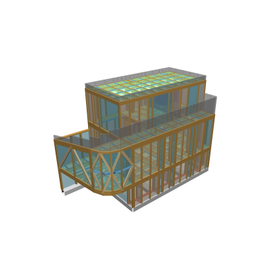
Structural Calculation Software Example │ Wooden 3-Story House

A three-story wooden frame house! An example of direct foundation with ground improvement using steel pipe piles.

We would like to introduce a case study of the structural calculation software "Super Build/SS7" for residential buildings. In this project, the emphasis was placed on achieving an elegant form and openness in the interior rather than structural rationality, resulting in different configurations and stress conditions at each joint. As a result, various joint types were employed, including traditional joints, metal fittings, glued-in rod methods, and one-sided shear joints using fabricated metal components, all chosen appropriately for their respective locations. The foundation is a direct foundation with ground improvement using steel pipe piles. 【Case Overview】 ■ Use: Residential ■ Structural Type: Wooden ■ Number of Floors: 3 ■ Design: Tokyo *For more details, please download the PDF or feel free to contact us.

  • Architectural Design Software
  • soft

Added to bookmarks

Bookmarks list

Bookmark has been removed

Bookmarks list

You can't add any more bookmarks

By registering as a member, you can increase the number of bookmarks you can save and organize them with labels.

Free membership registration