1~7 item / All 7 items
Displayed results

Added to bookmarks
Bookmarks listBookmark has been removed
Bookmarks listYou can't add any more bookmarks
By registering as a member, you can increase the number of bookmarks you can save and organize them with labels.
Free membership registration
Contact this company
Contact Us Online1~7 item / All 7 items
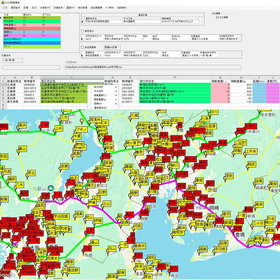
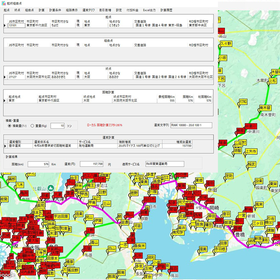
LogisticaTRUCK3 Truck Distance Fare Calculation Ver16 is a one-time purchase PC software that can calculate road distances based on the national freight automobile operating distance map and fares based on the Ministry of Land, Infrastructure, Transport and Tourism's standard fare or any custom fare table. Addresses can be calculated from JIS municipality codes, postal codes, and address strings! By loading any custom fare table, it can automatically recognize and register weight and distance increments. Additionally, bulk distance fare calculations for large datasets (Excel, CSV) are also possible. (1) National Freight Automobile Operating Distance Map You can calculate distances based on the "National Freight Automobile Operating Distance Map," which serves as the standard for freight automobile fare calculations issued by the Ministry of Transport (now the Ministry of Land, Infrastructure, Transport and Tourism). (2) Route Search Conditions You can choose between prioritizing major roads or general roads. When prioritizing major roads, major national highways are favored, while prioritizing general roads focuses on finding the shortest route regardless of national or local roads. (3) Fare Tariff It includes general freight automobile transportation business consolidated and charter fares from Showa 55 to Reiwa 6. Fare calculations allow for specifying a percentage for discounts or surcharges, and rounding options include rounding up, down, or to the nearest whole number. (4) Newly generated addresses are also reflected.
Added to bookmarks
Bookmarks listBookmark has been removed
Bookmarks listYou can't add any more bookmarks
By registering as a member, you can increase the number of bookmarks you can save and organize them with labels.
Free membership registration
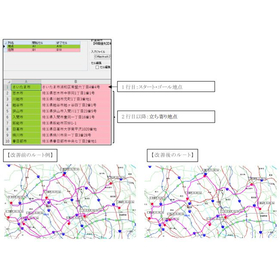
The "Shortest Route" feature allows for the quick creation and design of routes for milk runs and joint distribution. If you already have routes for the shortest route, milk runs, or joint distribution, you may experience improvements by using them. The Ver19 PA version allows for distance calculations without pay-per-use charges based on the number of calculations, just like before, with a one-time purchase. Additionally, there are no restrictions on the number of stops or usage for the "Shortest Route."
Added to bookmarks
Bookmarks listBookmark has been removed
Bookmarks listYou can't add any more bookmarks
By registering as a member, you can increase the number of bookmarks you can save and organize them with labels.
Free membership registration
Logistica Electronic Distance and Freight Rate Search Ver 5.0 is a one-time purchase PC software that calculates road distances based on the national freight vehicle operating distance chart. It can calculate distances from JIS municipality codes, postal codes, and address strings! (1) Road distances based on the national freight vehicle operating distance chart You can calculate distances based on the "National Freight Vehicle Operating Distance Chart," which serves as the standard for freight vehicle (truck) freight rate calculations issued by the Ministry of Transport (now the Ministry of Land, Infrastructure, Transport and Tourism). (2) Route search conditions You can choose from route search conditions that prioritize major roads or general roads. The major road priority selects routes that prioritize major national highways, while the general road priority selects routes that minimize distance regardless of national or local roads. (3) Freight tariff It includes freight rates for general freight vehicle transportation business from Showa 55 to Reiwa 6 for consolidated and charter services. Freight calculations can specify discounts or surcharges to one decimal place, and rounding can be done to the nearest 1, 10, 100, or 500 yen. (4) New addresses reflected New municipalities and postal codes are automatically linked to the operating distance chart points every month and can be used for address input.
Added to bookmarks
Bookmarks listBookmark has been removed
Bookmarks listYou can't add any more bookmarks
By registering as a member, you can increase the number of bookmarks you can save and organize them with labels.
Free membership registration
(1) Latest Digital Map Compatible with the long-selling Super Mapple Digital 27 produced by Mapple Co., Ltd. The map and search data, as well as the route search data for "cars," reflect information as of April 1, 2026. (2) Route Search Tailored to Vehicle Type You can explore routes that are passable based on the type of vehicle you are using. (3) Route Search Conditions You can choose from three conditions: highway priority, distance priority (prioritizing routes that minimize overall travel distance regardless of highways or local roads), and local road priority. (4) Address Accuracy The map and search data are created based on information as of April 1, 2026. It includes address data up to the level of municipalities, block numbers, and plots the address data at accurate locations on the road map. (5) Freight Tariff Includes general cargo motor transport business combined and charter freight rates from Showa 55 to Reiwa 6, as well as international large marine container transport rates. Freight calculations can specify discounts and surcharges to one decimal place, and rounding can be done to the nearest 1, 10, 100, or 500 yen.
Added to bookmarks
Bookmarks listBookmark has been removed
Bookmarks listYou can't add any more bookmarks
By registering as a member, you can increase the number of bookmarks you can save and organize them with labels.
Free membership registration
We calculate the commuting distance in kilometers between the workplace and the homes of employees who commute by car. We sell LogisticaMap-I, a version 6 tool for calculating commuting distances by car. By loading an Excel sheet, you can directly specify the cells for the workplace address, the first cell of the commuter address column, and the first cell of the one-way commuting distance column to calculate the commuting distance. The calculation results can be directly output to an Excel file. We use "PowerAtlas" from Sumitomo Electric Industries, Ltd. as the route search engine, or as an optional feature, we use Google's "GMP (Google Maps Platform)." The software is a purchase; it is not billed based on the number of calculations.
Added to bookmarks
Bookmarks listBookmark has been removed
Bookmarks listYou can't add any more bookmarks
By registering as a member, you can increase the number of bookmarks you can save and organize them with labels.
Free membership registration
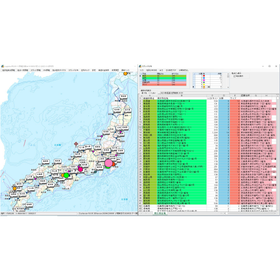
We handle the distance calculation software "LogisticaTRUCK-I National Sales Mileage Map Version 10," based on the National Freight Vehicle Sales Mileage Map (Notification No. 66 of 1972). It creates a distance table (in kilometers) from the "Starting Point Aggregate Distance" to all cities, wards, towns, and villages, and allows for distance calculations from freely formatted Excel and CSV files under "Spread Distance." Manufacturer/Distributor: Haruka System Research Co., Ltd.
Added to bookmarks
Bookmarks listBookmark has been removed
Bookmarks listYou can't add any more bookmarks
By registering as a member, you can increase the number of bookmarks you can save and organize them with labels.
Free membership registration
Our company offers the 'LogisticaTRUCK-III Truck Distance Fare Calculation Ver13', which can calculate the distance between the departure postal code and the destination postal code location. By loading a custom fare sheet and specifying the starting cell for the distance row/column and weight (loaded tons) row/column, it automatically recognizes and registers the increments for weight and distance. By preparing a sequence of addresses in an Excel sheet and simply specifying the starting cell for the address column, it is possible to calculate the distances for the starting point, destination, and waypoints. Additionally, it displays the processing status (processed and total number of cases) and elapsed processing time for large datasets in the "Base Fare Mileage Chart" and "Excel Distance Fare Calculation."
Added to bookmarks
Bookmarks listBookmark has been removed
Bookmarks listYou can't add any more bookmarks
By registering as a member, you can increase the number of bookmarks you can save and organize them with labels.
Free membership registration