
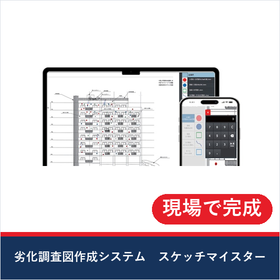
A deterioration survey diagram completed on-site. Just trace it on a tablet. No need to take it home for a clean copy anymore.
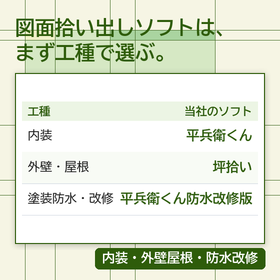
"Sketch Meister" is a deterioration survey drawing creation system for large-scale repairs and waterproofing renovations. Instead of bringing handwritten field notes back to the office to create drawings in CAD, the creation of deterioration survey drawings is completed on-site. Set the drawings and survey items in the office and send them to the on-site tablet, where you can simply touch the deteriorated areas on the drawing and input symbols and values. Once the survey is completed and saved, the deterioration survey drawing and quantity table can be output in the office simultaneously. No knowledge of CAD is required. Drawings can be in PDF format. Even if multiple teams survey a single property, the results can be consolidated. You can also load drawings that capture hidden areas using our "Heibei-kun Waterproofing Renovation Version" as drawings for the deterioration survey.
Inquire About This Product
basic information
【Structure】Office (loading, setting, and outputting drawings) + on-site tablet (inputting areas of deterioration) 【Drawings】PDF is acceptable (CAD data is not required) 【Survey Items】Material, type of deterioration (such as cracks), set by unit 【On-site Input】Touch the deteriorated areas with a pen to place symbols. Input length, quantity, and area (calculations done by entering width and height) using a numeric keypad. Operations are the same as on a smartphone, such as swipe and pinch. When symbols overlap, numbers are displayed with leader lines. 【Office Confirmation】The deterioration survey diagram is completed simultaneously with saving. It is possible to display all symbols, display individually, and adjust sizes. 【Output】Output the deterioration survey diagram and quantity table in Excel. 【Multiple Teams】Even if multiple teams survey one property, the results can be consolidated. 【Integration】Can load drawings from 'Heibei-kun Waterproof Renovation Version'.
Price information
Negotiable
Delivery Time
※During the introduction, an instructor will visit to provide guidance on basic to advanced operations. Please consult us regarding the schedule.
Applications/Examples of results
【Recommended Industries】Large-scale renovation contractors, waterproofing contractors 【Usage Scenarios】 - Preliminary surveys for large-scale repairs / deterioration surveys - Article 12 regular inspections (exterior wall deterioration) - On-site surveys before renovation estimates 【Implementation Effects】 - Elimination of post-return transcription work - Consolidation of surveys from multiple teams - Easier explanation of the rationale for repair locations using deterioration survey diagrams
Detailed information
-
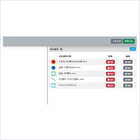
Load the drawings and set the survey items (office) / All drawing loading and settings are done at the office. Drawings can be in PDF format. When you set and save the property information, symbol size, and survey items (material, type of deterioration, unit), they will be sent to the field tablet.
-
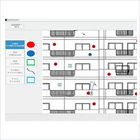
Touch the degraded areas (on-site) / When you scan the property on-site, the drawings and symbols for the degraded items will be displayed. When you touch the degraded area with a pen, a symbol with a number will be displayed. If the symbols overlap, the numbers will be shown with leader lines.
-
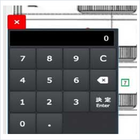
Input the numbers (on-site) / The numeric keypad will be displayed simultaneously with the touch, so input the values for length, quantity, and area. The area is calculated simply by entering the vertical and horizontal values in order.
-
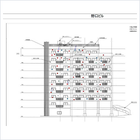
Confirm the survey results (office) / As soon as the input is completed and saved on-site, the deterioration survey diagram is completed on the office side. Symbols can be displayed in full or individually, and their size can also be adjusted at this point.
-
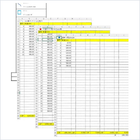
Output in Excel (Office) / The deterioration survey diagram and quantity table will be output as Excel data.
Company information

Sanyu Hanbai Co., Ltd. has been selling useful software as a group company of a software development company for the architecture and construction industry. In a field where speed is essential, the ability to use software smoothly is what we consider truly useful software. We will continue to strive to provide user-friendly software, and we appreciate your continued support.