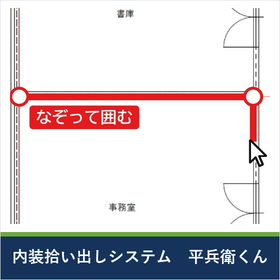
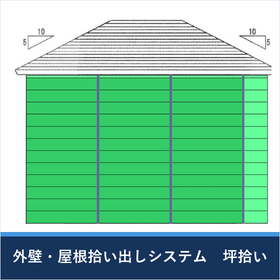
Is there a proper profit in that estimate? How much will be left at that site?
"Mocal" is a takeoff and execution budget system for siding exterior walls and roofing work. By tracing the drawings to take off quantities, the manufacturer's series name, product name, color, waterproof sheets, and fittings are linked with model numbers. By simply pressing the execution budget button, the purchase cost, sales to the general contractor, and estimates are calculated for each product, providing sales, estimated costs, estimated gross profit, and gross profit margin. Changing the loss rate, markup rate, or supplier immediately reflects in the cost and gross profit. It also includes catalogs from alternative manufacturers, allowing you to compare "how much profit remains for this product" on the spot. The estimate is output with the maximum gross profit, and after receiving an order, purchase orders are automatically created by supplier and subcontractor. It visualizes the gross profit on-site until completion. From takeoff to execution budget, estimates, orders, and aggregation, everything flows in one process. Maximum gross profit with minimal effort.
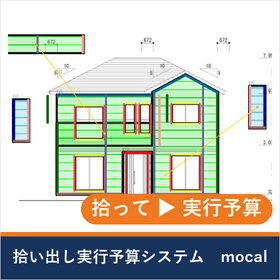
Inquire About This Product
basic information
【Structure】 Picking System: Manufacturer construction method settings / Picking / Multi-drawing input (simultaneous for 4 sides) / Siding product settings / Labor cost adjustments per project Execution Budget System (Web authentication): Execution budget and cost adjustments / Estimates / Orders / Order forms / Aggregation 【Registration】 Suppliers, purchase prices, and products are registered in-house. Setting of markup rates, loss rates, and customer-specific rates 【Product Information】 Linked with siding manufacturer catalog information (including alternative manufacturers' catalogs) 【Aggregation】 Gross profit aggregated by supplier, general contractor, project, monthly, and annually. A list comparing execution budgets to final gross profits for each project 【Output】 Estimates, order forms, purchase orders, and detailed Excel output 【Communication】 Encrypted with SSL/TLS (cloud infrastructure) 【Operating Environment】 Windows 11 (Japanese version) / Core i series / 4GB or more memory / 10GB or more HDD / 128MB or more VRAM / True Color (32bit) / Office required / Scanner and multifunction printer (A3 recommended) *Arm version, Boot Camp, and virtualization are not guaranteed to work
Price information
For more details, please contact us.
Delivery Time
※We will visit shortly after the introduction and explain the operating procedures. Please consult us regarding the schedule.
Applications/Examples of results
【Recommended Industries】Exterior wall contractors, roofing contractors, exterior renovation contractors 【Situations to Use】 - When you want to attach detailed execution budgets to all estimate requests - When material costs and purchase prices have risen, and you want to reassess gross profit - When you want to consolidate takeoff, estimation, and ordering into a single flow - When you want to aggregate profits by main contractor and supplier later 【Three Proposals】 - Provide detailed execution budgets based on precise cost calculations for all estimate requests - Adjust all execution budgets to minimum costs and maximum profits - Visualize gross profit management for all sites and thoroughly manage incurred costs
Detailed information
-
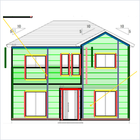
Trace the drawings to extract quantities. By simply reading and tracing the drawings, you can calculate the quantities of materials up to the fittings. You can input the elevation views of all four sides simultaneously, and the extracted data can be sent directly to the execution budget system.
-
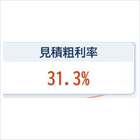
Automatically create an execution budget. By simply pressing the execution budget button, the purchase cost, sales to the main contractor, and estimates are calculated for each product, and sales, estimated costs, estimated gross profit, and gross profit margin are generated. The unit price for each main contractor can also be applied.
-
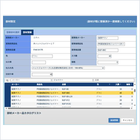
Adjust the cost and estimate. By changing the loss rate, margin rate, unit price, and supplier, the cost and gross profit will be reflected immediately. You can also replace it with alternative products you always use, allowing you to generate an estimate with maximum gross profit.
-
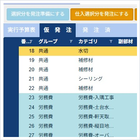
Automatically create purchase orders. After receiving an order, when you place orders for material costs and outsourcing costs, purchase orders and order forms will be created for each supplier and outsourcing partner, reflecting in the final cost.
-
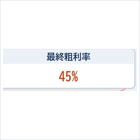
Aggregate the final gross profit. Monthly aggregation of sales by general contractor for completed projects and purchase amounts by supplier. A list of the actual budget and final gross profit for each project can also be created.
catalog(1)
Download All Catalogs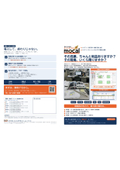
Company information

Sanyu Hanbai Co., Ltd. has been selling useful software as a group company of a software development company for the architecture and construction industry. In a field where speed is essential, the ability to use software smoothly is what we consider truly useful software. We will continue to strive to provide user-friendly software, and we appreciate your continued support.