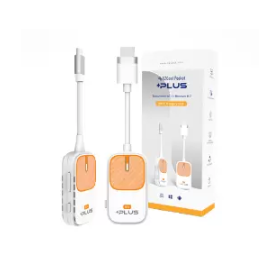
A hybrid mirroring system that combines "just placing" and "wireless projection."
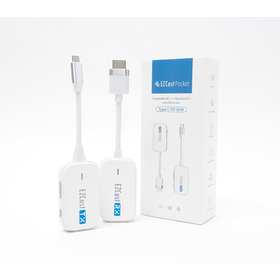
Point 1: The hybrid 2-in-1 of "plug-and-play projection" and "wireless projection" expands the range of mirroring. "Plug-and-play projection" automatically displays the screen when a Type-C transmitter is connected. "Wireless projection" does not require router or app settings with Miracast/Airplay functionality, significantly reducing preparation time for meetings and classes. Point 2: Industry-first "MiraPlug" app allows projection even on Android devices that do not support DP-Alt (video output). By downloading the manufacturer-developed "MiraPlug" app from Google Play, all Android smartphones that previously did not support video output can now project. *The MiraPlug app does not support HDCP. Point 3: Change projection methods according to location and situation for optimal mirroring environments for each OS. For example, when using a Chromebook or watching video streaming apps, you can choose "plug-and-play projection," and when you don't want to attach a transmitter to your smartphone, you can opt for "wireless projection." It is effective in a wide range of scenes, including education, business, and video viewing.
Inquire About This Product
basic information
Transmitter Hardware Specifications Maximum Resolution: 1920x1080 (60p) Display Interface: USB-C with DP-Alt / USB-C / Legacy USB Wi-Fi: IEEE802.11n 5GHz 1T1R Recommended Temperature, Storage Temperature: Operating Temperature: 0〜35℃ Storage Temperature: -20〜70℃ Weight: Approximately 38g Size: Main Unit (excluding cable part): 70mmx40mmx16mm Cable Length including Connector (non-detachable): 100mm Receiver Hardware Specifications Maximum Resolution: 1920x1080 (60p) Display Interface: HDMI Wi-Fi: IEEE 802.11n 2.4G & 5GHz 1T1R Power: DC 5V/1A Operating Temperature, Storage Temperature: Operating Temperature: 0〜35℃ Storage Temperature: -20〜70℃ Weight: Approximately 46g Size: Main Unit (excluding cable part): 70mmx40mmx16mm Cable Length including Connector (non-detachable): 100mm
Price information
17,800 yen (excluding tax)
Price range
P2
Delivery Time
P2
※The delivery time may vary depending on the quantity, so please feel free to contact us.
Applications/Examples of results
In meetings and classes, I want to easily mirror multiple devices and multiple operating systems with centralized management. With EZCast Pocket PLUS, you can freely choose 'plug-and-project' and 'wireless projection' from each OS to achieve the optimal mirroring environment. "There are devices that do not support mirroring. With our uniquely developed dedicated app 'MiraPlug', Android devices that do not support DP-Alt can be projected. "Due to network and security restrictions, it is not possible to introduce devices. Both 'plug-and-project' and 'wireless projection' can be used without integrating into the existing network, making it widely usable in educational settings (you can try it out in advance with a demo unit).
Detailed information
-
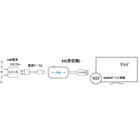
Projection Method: * Connect the EZCast Pocket PLUS to a monitor (TV/projector/monitor via HDMI) and a power outlet (5V1A). * Once the home screen appears, project from your mobile device (PC/tablet/smartphone). 【Plug-and-Play Projection】When you connect the transmitter to your mobile device (PC/tablet/smartphone), mirroring will start automatically. 【Wireless Projection】You can project wirelessly from devices equipped with Miracast/Airplay. Windows ⇒ Press the Windows button + K button simultaneously, and select the SSID at the bottom right. Android ⇒ Galaxy: SmartView, Xperia: Screen Mirroring, AQUOS: Cast, etc., press and select the SSID. *1 MAC, iOS ⇒ In the Control Center, press Screen Mirroring and select the SSID. *2 *1… The names and operation methods may vary depending on the device. *2… On the first use, you will need to enter a 4-digit Airplay code displayed on the screen. *3… Chromebook cannot be used with this projection method. Please use the Plug-and-Play Projection.
Line up(1)
| Model number | overview |
|---|---|
| EZCast Pocket+ |
Company information
Our company operates as a solutions provider for electronics engineering connecting Japan and Taiwan, engaging in high-tech fields such as IT equipment and semiconductors (ICs). Additionally, in Japan, we offer nursing care support services to meet the demands of the times. Please feel free to contact us if you have any inquiries.


![Outdoor wireless transmission device "G-Wave" [NETIS registered]](https://image.www.ipros.com/public/product/image/2f3/2001151832/IPROS5803660184779988668.jpg?w=280&h=280)