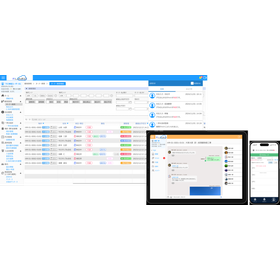
[Industry First!] Automatic detection of differences between floor plans, longitudinal sections, and cross sections.
The integration navigator is a drawing consistency check tool that allows for intuitive verification of discrepancies in 2D drawings. By clicking on a measurement point, corresponding floor plans, cross-sections, and longitudinal sections are displayed side by side on one screen, enabling smooth verification of consistency between drawings. Additionally, cross-sectional lines can be overlaid on the floor plan, making it easy to identify where discrepancies occur at a glance. Tasks that were previously done by comparing paper drawings can now be easily completed on a PC, significantly reducing the burden on field personnel. It features user-friendly operations that allow even those unfamiliar with PCs to efficiently progress through multiple drawings while checking and registering necessary information simply by clicking on text in the drawings.

Inquire About This Product
basic information
- Overlay cross-sectional lines on the floor plan By overlapping cross-sectional lines on the floor plan, you can check the positional relationships at a glance. This creates an efficient verification environment where anyone can easily see "where the misalignment is" without needing to switch between drawings for comparison. - Display floor plans, longitudinal sections, and cross-sections on one screen You can consolidate the floor plan, cross-section, and longitudinal section into a single screen. With necessary information always visible, there is no need to reopen or search for drawings, allowing for efficient consistency checks without interrupting the workflow. - Retrieve any information by clicking on the drawing Even if you don't have documents like calculation sheets on hand, you can check and register necessary information simply by clicking on the text in the drawing. This eliminates the need for tedious manual data entry, as you can access the desired sections with one click, allowing tasks to be completed using only the information on the drawing and contributing to the efficiency of verification tasks. - Unfilled input check function When you set "input check," it alerts you if there are any missing entries in the required fields. This provides peace of mind by preventing minor mistakes, even as the number of check items increases.
Price range
Delivery Time
Applications/Examples of results
For more details, please refer to the materials or feel free to contact us.
News about this product(3)


Company information

Kinos Logic is a system development company that has been active in Nagoya since its establishment in 1993, focusing on the development of surveying CAD systems. We have developed our own surveying CAD systems and continued to grow, utilizing the technology, experience, and know-how we have cultivated over the years to develop high-quality and user-friendly systems that our customers will appreciate. The construction and civil engineering industry is currently undergoing a significant transformation, with advancements in efficiency and the introduction of new technologies. We aim to provide innovative solutions that meet the needs of the industry through the enhancement of existing products and the development of new ones.
![[Brochure] MOISS Furniture Guide](https://image.www.ipros.com/public/product/image/e7d/2000426442/IPROS16408424494091067391.jpg?w=280&h=280)