1~4 item / All 4 items
Displayed results

Added to bookmarks
Bookmarks listBookmark has been removed
Bookmarks listYou can't add any more bookmarks
By registering as a member, you can increase the number of bookmarks you can save and organize them with labels.
Free membership registrationContact this company
Contact Us Online1~4 item / All 4 items
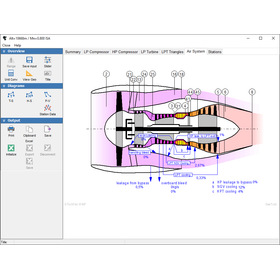
GasTurb is a gas turbine performance analysis software provided by Concepts NREC. It simulates major gas turbine configurations for propulsion (aerospace) and power generation, supporting cycle design and performance evaluation. It features an intuitive task-oriented user interface, allowing users to view results in both list and graphical formats. It is a tool that enables performance engineers to efficiently carry out their daily tasks—design point analysis, off-design evaluation, and parametric studies.
Added to bookmarks
Bookmarks listBookmark has been removed
Bookmarks listYou can't add any more bookmarks
By registering as a member, you can increase the number of bookmarks you can save and organize them with labels.
Free membership registration
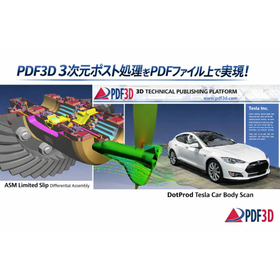
PDF3D PV+ is a plugin that outputs visualization results from ParaView into a 3D PDF file (3D PDF). A 3D PDF is a PDF document that incorporates three-dimensional shape data. When displayed using the free Acrobat Reader that is commonly used in daily operations, the following features are available: - Rotate, move, and zoom in/out on the 3D shapes using mouse controls - Select and display only specific parts - Hide outer parts to show the interior - Display 3D animations
Added to bookmarks
Bookmarks listBookmark has been removed
Bookmarks listYou can't add any more bookmarks
By registering as a member, you can increase the number of bookmarks you can save and organize them with labels.
Free membership registration
This is a PDF document that incorporates 3D shape data, and by using Acrobat Reader (free version) on a Windows or macOS PC, the following actions can be performed: - Rotate, move, and zoom in/out on the 3D shape using mouse operations - Extract and display only certain parts - Hide outer components to view the interior - Measure distances using mouse picking - Display 3D animations
Added to bookmarks
Bookmarks listBookmark has been removed
Bookmarks listYou can't add any more bookmarks
By registering as a member, you can increase the number of bookmarks you can save and organize them with labels.
Free membership registration
This document introduces the results of automobile collision analysis. After allowing the display of the content, you can click in the 3D view area to load the data and start the animation. We have also included instructions on how to rotate, zoom in and out, and move using mouse operations, so please take a moment to read through it. 【Contents】 ■ Operating Instructions - Drag with the left mouse button: Rotate - Drag up and down with the right mouse button: Zoom in and out - Drag with both the left and right mouse buttons: Move *For more details, please download the PDF or feel free to contact us.
Added to bookmarks
Bookmarks listBookmark has been removed
Bookmarks listYou can't add any more bookmarks
By registering as a member, you can increase the number of bookmarks you can save and organize them with labels.
Free membership registration