1~5 item / All 5 items
Displayed results

Added to bookmarks
Bookmarks listBookmark has been removed
Bookmarks listYou can't add any more bookmarks
By registering as a member, you can increase the number of bookmarks you can save and organize them with labels.
Free membership registrationContact this company
Contact Us OnlineBefore making an inquiry
Download PDF1~5 item / All 5 items
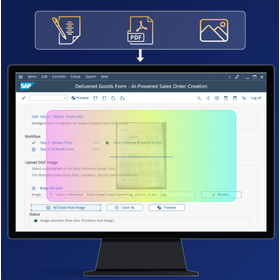
AI Support for SAP Transactions - The SAP team transforms documents, images, and business data into SAP transactions, notifications, and visual insights, reducing manual work. - Instead of searching for complex SAP item relationships, users can review the content extracted by AI and create transactions. *No ABAP changes, no custom development, no changes to the SAP backend required. 【Business Benefits】 - Reduction of manual input Extract information from PDFs, forms, and images, and directly map it to SAP items, reducing repetitive input. - Improved data accuracy AI identifies and structures information, allowing users to verify before completing transactions. - Simplification of SAP operations Reduces the burden of memorizing complex transactions and item mappings. 【Examples of Use in SAP Operations】 1. Order Registration (VA01) Extracts customer, item, quantity, and delivery date from PDFs, scanned forms, and handwritten documents, mapping them to SAP items. The responsible person verifies the content and confirms the order. 2. Equipment Maintenance Analyzes equipment images to organize observations and connects them to SAP maintenance notifications for scheduling and creation.
Added to bookmarks
Bookmarks listBookmark has been removed
Bookmarks listYou can't add any more bookmarks
By registering as a member, you can increase the number of bookmarks you can save and organize them with labels.
Free membership registration
We are introducing case studies and examples that showcase why SAP users around the world adopted Liquid UI, in which areas it has been effective, and how much value it has generated.
Added to bookmarks
Bookmarks listBookmark has been removed
Bookmarks listYou can't add any more bookmarks
By registering as a member, you can increase the number of bookmarks you can save and organize them with labels.
Free membership registration
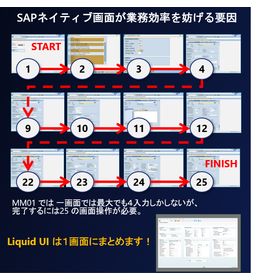
This is a technology for companies that continue to use ECC and the ECC UI in S4/HANA. With the current UI, it is necessary to navigate through multiple screens to complete a transaction. For example, in MM01, there are cases where 25 screens need to be navigated, many of which do not require input, and even on screens that do require input, unnecessary fields are displayed. This leads to increased input time and the potential for input errors, making it a significant issue for companies as it hinders productivity. Liquid UI is a technology that allows for the display of only the necessary input fields on a single screen, eliminating screens that do not require input. Here are some examples of its effectiveness: 1. 86% reduction in input screens (Japanese airline) 2. Reduction in work time by 2,680 hours annually (Japanese manufacturing company) 3. 78% decrease in input errors (U.S. electric company) 4. Improvement worth approximately 200 million yen annually due to increased productivity (U.S. medical device manufacturer) Liquid UI also enables the mobility of SAP. *For more details, please refer to Liquid UI for iOS/Android.
Added to bookmarks
Bookmarks listBookmark has been removed
Bookmarks listYou can't add any more bookmarks
By registering as a member, you can increase the number of bookmarks you can save and organize them with labels.
Free membership registration
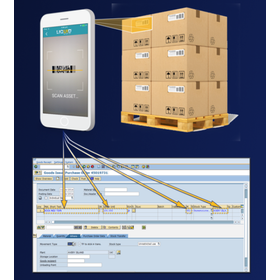
Our "Liquid UI for iOS / Android" allows you to take SAP onto mobile devices. By leveraging the capabilities of mobile devices and integrating with SAP, it contributes to improved input efficiency, reduced work errors, and minimized opportunity loss through immediate data reflection. 【Available Features】 - Barcode / QR code reader - Photo capture - GPS - RFID - Signature - Push notifications 【Compatible Products】 You can use SAP on mobile devices simply by downloading Liquid UI. There are no restrictions as long as the product is compatible with iOS or Android. It can be used on all devices, including mobile phones, tablets, and handheld devices. 【Features of Liquid UI for iOS / Android】 - Immediately available upon app download (when using existing SAP screens as is) - No programming required (when using existing SAP screens as is) - No middleware required (e.g., Telnet) - No security gaps - No performance delays - No barriers to rollout or implementation
Added to bookmarks
Bookmarks listBookmark has been removed
Bookmarks listYou can't add any more bookmarks
By registering as a member, you can increase the number of bookmarks you can save and organize them with labels.
Free membership registration
Our "Liquid UI for iOS / Android" allows you to take SAP onto mobile devices. By leveraging the capabilities of mobile devices and integrating with SAP, it contributes to improved input efficiency, reduced work errors, and minimized opportunity loss through immediate data reflection. 【Available Features】 - Barcode / QR code reader - Photo capture - GPS - RFID - Signature - Push notifications 【Compatible Products】 There are no restrictions as long as the product is compatible with iOS or Android. It can be used on all devices, including mobile phones, tablets, and handheld devices. 【Features of Liquid UI for iOS / Android】 - Immediately available (when using existing SAP screens as is) - No programming required (when using existing SAP screens as is) - No middleware required (e.g., Telnet) - No security gaps - No performance delays - No barriers to rollout or implementation - Supports both online and offline usage
Added to bookmarks
Bookmarks listBookmark has been removed
Bookmarks listYou can't add any more bookmarks
By registering as a member, you can increase the number of bookmarks you can save and organize them with labels.
Free membership registration