1~33 item / All 33 items
Displayed results
Filter by category

Added to bookmarks
Bookmarks listBookmark has been removed
Bookmarks listYou can't add any more bookmarks
By registering as a member, you can increase the number of bookmarks you can save and organize them with labels.
Free membership registration
Contact this company
Contact Us Online1~33 item / All 33 items
Filter by category

◆What is Dropbox Replay? Dropbox Replay is available for free to anyone with a Dropbox account. It allows you to easily collect comments, respond to feedback, and conduct final checks on video and audio projects all in one place. It is a user-friendly tool that everyone will love. By utilizing Replay, clients and creators can access the same video and collaborate on review tasks. You will be freed from the hassle of complicated feedback exchanges, enabling more efficient work.
Added to bookmarks
Bookmarks listBookmark has been removed
Bookmarks listYou can't add any more bookmarks
By registering as a member, you can increase the number of bookmarks you can save and organize them with labels.
Free membership registration
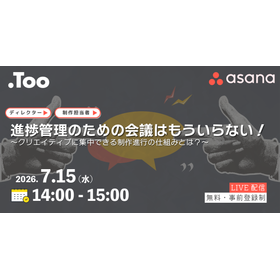
"I can't grasp who is responsible for what." "Requests and comments are scattered across email, chat, and verbal communication." "I can't see the workload of the members, making it difficult to make assignment decisions." "The number of meetings and reporting tasks for progress checks is increasing." In the production environment, progress management is important, but isn't a lot of time and cost spent on confirmations and reports? In an environment where progress is not visible, delays and misalignments are likely to occur, and delayed problem detection can lead to deadline delays and quality degradation. In this webinar, we will introduce a specific production progress system that reduces confirmation and reporting tasks through the visualization of progress and centralized management of information using the work management tool "Asana." ──────────── [Seminar Overview] Organizer: Too Corporation Date and Time: July 15, 2026 (Wednesday) 14:00 - 15:00 Venue: Online via Zoom Webinar (participation possible from anywhere in the country) Participation Fee: Free / Pre-registration required Registration: https://www.too.com/event/2026/asana_07/?utm_source=ipros_link
Added to bookmarks
Bookmarks listBookmark has been removed
Bookmarks listYou can't add any more bookmarks
By registering as a member, you can increase the number of bookmarks you can save and organize them with labels.
Free membership registration
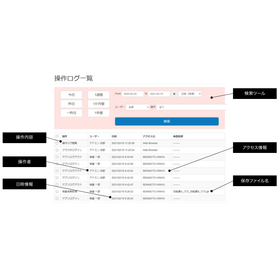
"Hallmarker DI" is a printing material inspection system. For acceptance inspections by pharmaceutical companies and medical device manufacturers, data integrity beyond mere inspection is required. We are entering an era where managing a consistent data lifecycle is essential. In addition to the standard functions of Hallmarker, it also addresses the data integrity requirements of pharmaceutical companies. [Features] ■ Account-based permission management/login functionality ■ Audit trail ■ Tamper-proof inspection results ■ Secure encrypted management of raw data ■ Inspection to approval flow *For more details, please download the PDF or feel free to contact us.
Added to bookmarks
Bookmarks listBookmark has been removed
Bookmarks listYou can't add any more bookmarks
By registering as a member, you can increase the number of bookmarks you can save and organize them with labels.
Free membership registration
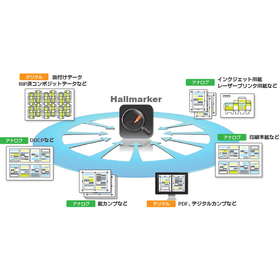
"Hallmarker" is a comprehensive printing inspection software. It is an all-purpose inspection system that supports various shapes, sizes, and media, including digital data versus paper proofs. It also corrects for paper expansion and contraction, rotation during input, and differences caused by printer ink bleeding. It can handle comparisons of any patterns that occur in the printing process. With easy operation, anyone can perform high-precision inspections. 【Features】 ■ Further improved scratch detection capability ■ Compatible with Windows 11 ■ Extensive inspection range specification ■ Accurate inspection with advanced distortion correction ■ Inspection of any combination *For more details, please download the PDF or feel free to contact us.
Added to bookmarks
Bookmarks listBookmark has been removed
Bookmarks listYou can't add any more bookmarks
By registering as a member, you can increase the number of bookmarks you can save and organize them with labels.
Free membership registration
"HallmarkCenter" is an automatic inspection software for large-volume printed materials. You can perform automatic inspections simply by dragging files into a folder, and it can inspect both printed paper and digital data. Moreover, it can reliably detect defects that might be overlooked by the human eye. It excels in inspections that require comparing large amounts of content at once, such as those involving large-volume pages. It significantly improves the efficiency of the work for printing and plate-making personnel. 【Features】 ■ Printing simulation function ■ Direct PDF input (optional) ■ Inspection result storage ■ Barcode inspection ■ New distortion correction technology *For more details, please download the PDF or feel free to contact us.
Added to bookmarks
Bookmarks listBookmark has been removed
Bookmarks listYou can't add any more bookmarks
By registering as a member, you can increase the number of bookmarks you can save and organize them with labels.
Free membership registration
"Hallmarker Elements" is a subscription-based image comparison software. Printed materials can be scanned and inspected, allowing for instant comparison of differences before and after corrections for blueprints, proof sheets, printed materials, design data, and more. Inspections can be conducted in various formats. One license can be installed on multiple devices, and activation can be done as needed during use. It is suitable for remote work as it can be installed on multiple PCs. 【Features】 ■ Trust in inspections, proceed to the next stage with confidence ■ Standardization of high-quality assurance levels ■ Inspect anytime, regardless of whether it’s paper or data ■ Usable in both office and home settings ■ Eliminate high initial costs with an easy-to-implement flat-rate system *For more details, please download the PDF or feel free to contact us.
Added to bookmarks
Bookmarks listBookmark has been removed
Bookmarks listYou can't add any more bookmarks
By registering as a member, you can increase the number of bookmarks you can save and organize them with labels.
Free membership registration
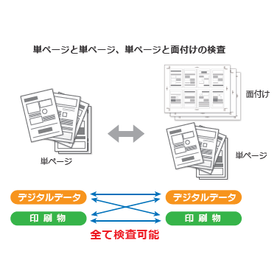
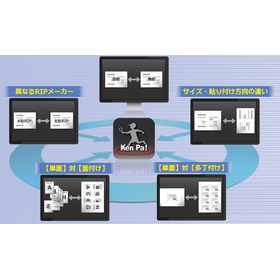
"Ken2Pa!" is a digital printing comparison inspection software. It is capable of inspecting the content of digital data under various conditions. It not only compares the traditional "first proof" against "second proof," but also inspects differences in RIP manufacturers, sizes, and placement directions. Defects can be detected in any combination of inspections. It excels in inspecting large volumes of content, such as bulk page inspections, significantly improving the efficiency of the work for printing and plate-making personnel. 【Features】 ■ Different RIP manufacturers ■ Differences in size and placement direction ■ "Single-sided" vs. "Imposition" ■ "Single-sided" vs. "Multiple imposition" ■ Direct PDF input ■ Barcode inspection *For more details, please download the PDF or feel free to contact us.
Added to bookmarks
Bookmarks listBookmark has been removed
Bookmarks listYou can't add any more bookmarks
By registering as a member, you can increase the number of bookmarks you can save and organize them with labels.
Free membership registration
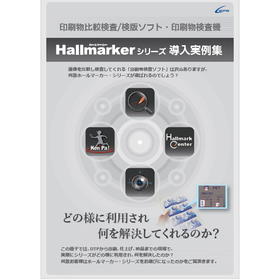
This document is a collection of case studies on the implementation of the printed material comparison inspection system "Hallmarker" series. You can see how the series is actually utilized on-site, from DTP to printing, finishing, and delivery, and what issues it has resolved. It focuses on the problems that actual customers faced and how the series addressed those issues. 【Sample Cases (Partial)】 ■ Case 1 Food Packaging and Paperboard ■ Case 2 Contract Terms ■ Case 3 Form Printed Materials ■ Case 4 Pharmaceutical Labels ■ Case 5 Tablet Packaging Pharmaceutical Packages ■ Case 6 Full-Color Books *For more details, please download the PDF or feel free to contact us.
Added to bookmarks
Bookmarks listBookmark has been removed
Bookmarks listYou can't add any more bookmarks
By registering as a member, you can increase the number of bookmarks you can save and organize them with labels.
Free membership registration
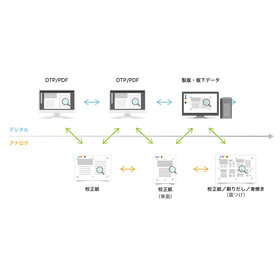
The "Hallmarker Series" is a printing comparison inspection system that enables high-precision comparisons regardless of the combination of digital and analog, thanks to its uniquely developed engine. It dramatically improves the efficiency of visual inspections during the printing process, including proof paper inspections and random sampling inspections. It supports printing inspections, packaging inspections, plate inspections, and incoming inspections. With our uniquely developed inspection engine, it can identify only true defects. Even if the layouts differ, it can automatically align and inspect. 【Features】 ■ Easy operation ■ Automatic alignment function ■ Automatic distortion verification function *For more details, please download the PDF or feel free to contact us.
Added to bookmarks
Bookmarks listBookmark has been removed
Bookmarks listYou can't add any more bookmarks
By registering as a member, you can increase the number of bookmarks you can save and organize them with labels.
Free membership registration
This document summarizes the differences from the individual version, the benefits of implementation, and management methods. The Adobe Group Plan (corporate plan) is a membership-based service aimed at corporate use. Not only can you use the tools necessary for creative work, but there are also many advantages not found in the individual version, such as ease of purchase procedures and license management. [Contents (partial)] ■ About Adobe product plans ■ Benefits of the corporate version ■ Discounts and campaigns exclusive to the corporate version ■ Examples of transitioning from the individual version to the corporate version ■ Is the corporate version suitable? Checklist ■ About Too *For more details, please download the PDF or feel free to contact us.
Added to bookmarks
Bookmarks listBookmark has been removed
Bookmarks listYou can't add any more bookmarks
By registering as a member, you can increase the number of bookmarks you can save and organize them with labels.
Free membership registration
This document is a product brochure for "Adobe products," summarizing their features, usage methods, and key points regarding corporate licenses in an easy-to-understand manner. It includes information about a subscription-based service that offers a variety of tools necessary for production and office tasks. Any issues related to Adobe products can be resolved by implementing a corporate plan. [Contents (partial)] ■ About Adobe products ■ List of Adobe products ■ Is your management of Adobe products implemented in your company okay? ■ What is a corporate plan? ■ Benefits of the corporate plan ■ Discount plans *For more details, please download the PDF or feel free to contact us.
Added to bookmarks
Bookmarks listBookmark has been removed
Bookmarks listYou can't add any more bookmarks
By registering as a member, you can increase the number of bookmarks you can save and organize them with labels.
Free membership registration
This document is an introduction to a "work management tool" for centralized management of tasks and projects. Are you struggling to understand your members' schedules and the amount of tasks they are handling? By visualizing each employee's workload and performance, you can quickly follow up while creating a more comfortable working environment. [Contents (partial)] ■ What can be achieved through work management ■ What is Asana? ■ Challenges from the perspective of managers and leaders ■ Challenges from the perspective of users and project members ■ Benefits of implementing Asana ■ Types of tasks that can be managed with "work management" using Asana *For more details, please download the PDF or feel free to contact us.
Added to bookmarks
Bookmarks listBookmark has been removed
Bookmarks listYou can't add any more bookmarks
By registering as a member, you can increase the number of bookmarks you can save and organize them with labels.
Free membership registration
This document provides a thorough explanation of the basic usage and convenient features of "Miro." It includes content that supports rapid idea generation, iteration, and validation with AI. By registering for an account, you can immediately improve your work efficiency. While maximizing creativity, you can carry out high-productivity tasks such as problem-solving. 【Contents (partial)】 ■ Basic functions ■ Miro Intelligent Canvas ■ Phase 1 Brainstorming ■ Phase 2 Discussion ■ Phase 3 Summary for Kick-off ■ Pricing plans *For more details, please download the PDF or feel free to contact us.
Added to bookmarks
Bookmarks listBookmark has been removed
Bookmarks listYou can't add any more bookmarks
By registering as a member, you can increase the number of bookmarks you can save and organize them with labels.
Free membership registration
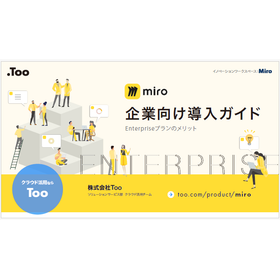
This document is an implementation guide equipped with the security and management features of the "Miro" Enterprise plan. As the scale of IT tool implementation expands, challenges become apparent in terms of usage, security, and costs. The same can be said for Miro. Advanced security features such as encryption key management, automatic data discovery, and confidential classification can be added. 【Contents (partial)】 ■Common challenges in IT tool implementation ■What is the Miro Enterprise plan? ■POINT 1: Understanding usage ■POINT 2: Establishing security ■POINT 3: Cost management ■Information on individual demos and consultation sessions *For more details, please download the PDF or feel free to contact us.
Added to bookmarks
Bookmarks listBookmark has been removed
Bookmarks listYou can't add any more bookmarks
By registering as a member, you can increase the number of bookmarks you can save and organize them with labels.
Free membership registration
This document is a white paper aimed at making data sharing and management at the 100-gigabyte level easier. It introduces the advantages, disadvantages, and challenges of using a free link issuance service for ordering and delivering large volumes of data to external partners. By centralizing scattered tools, it enables safe and smooth data management and sharing. [Contents] ■ Common business flows and challenges ■ Advantages and disadvantages of the free link issuance service ■ Three use cases that can be solved with Dropbox ■ Key points for coexisting physical servers and Dropbox ■ Summary ■ Benefits of introducing Dropbox from Too *For more details, please download the PDF or feel free to contact us.
Added to bookmarks
Bookmarks listBookmark has been removed
Bookmarks listYou can't add any more bookmarks
By registering as a member, you can increase the number of bookmarks you can save and organize them with labels.
Free membership registration
Are you facing the challenge of wanting to migrate to cloud storage but not knowing the best storage management for your company, while being overwhelmed by daily operations and putting off the consideration? To address such concerns, Too, which has been working closely with companies in the creative industry, is providing materials that introduce the challenges faced on-site and their solutions, using Box and Dropbox as examples. We will solve issues such as "I want to migrate from a file server to the cloud" and "I want to externally share data with business partners." Please take advantage of this opportunity to utilize our materials. [Considering Migration from File Server to Cloud] - Attention needed for bandwidth limitations - Migration schedule varies depending on file server usage capacity and network environment - Once overcome, physical management is unnecessary and can be used for a long time *For more details, please download the PDF or feel free to contact us.
Added to bookmarks
Bookmarks listBookmark has been removed
Bookmarks listYou can't add any more bookmarks
By registering as a member, you can increase the number of bookmarks you can save and organize them with labels.
Free membership registration
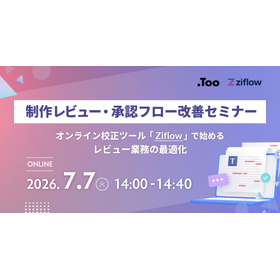
"Correction instructions are scattered in emails and chats." "I don't know who is confirming and whose approval is pending." "Confirmation omissions and rejections are occurring, causing delays in production progress." Are you experiencing such challenges in the review and approval process of your company's promotional materials, web pages, videos, proposal documents, design drafts, and other daily production items? In the webinar scheduled for July 7, 2026, we will introduce how to streamline the confirmation, correction, and approval processes of production materials using the online proofing tool "Ziflow." We will clearly explain the points for smoothly operating the review process, which tends to become personal, through centralized management of correction comments, visualization of approval flows, and smooth communication with stakeholders, using actual operation screens. Additionally, we will touch on the future roadmap that includes AI features and discuss the future of review work and the potential for further business improvements.
Added to bookmarks
Bookmarks listBookmark has been removed
Bookmarks listYou can't add any more bookmarks
By registering as a member, you can increase the number of bookmarks you can save and organize them with labels.
Free membership registration
The 'New and Old Documents' is an important document revision management tool that can automatically create a comparison table showing the differences between documents at a glance. [Features] <New and Old Documents Excel Version> ■ Compare two documents and quickly grasp changes even in large worksheets ■ Automatically generate accurate and easy-to-read 'Difference List' and 'Difference Report' with simple operations ■ Jump to the cells with changes from the comparison display with one click ■ Compare not only text and values but also formulas and calculation results ■ Allows comparison of old versions of Excel and CSV files *For more details, please refer to the related links or feel free to contact us.
Added to bookmarks
Bookmarks listBookmark has been removed
Bookmarks listYou can't add any more bookmarks
By registering as a member, you can increase the number of bookmarks you can save and organize them with labels.
Free membership registration
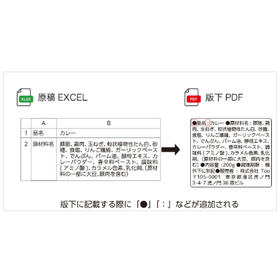
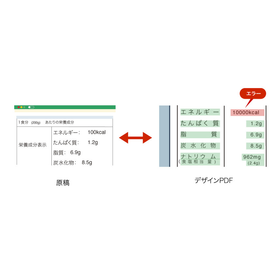
"Sowaos" is a production support and proofreading service designed to prevent typographical errors and reduce checking mistakes at various stages leading up to the completion of product package design. From a range of functions tailored to different stages of package production, you can implement only the necessary features according to your needs, allowing for cost reduction. Additionally, you can rely on the service to check whether the manuscript is appropriately placed without being affected by the layout of the design PDF, thereby reducing the burden on the person in charge and minimizing checking errors. 【Features】 ■ Text comparison between Excel and PDF ■ Text comparison between PDFs ■ Image comparison between PDFs ■ Mandatory and prohibited text checks ■ Font size check function ■ Logo and mark detection function *For more details, please refer to the related links or feel free to contact us.
Added to bookmarks
Bookmarks listBookmark has been removed
Bookmarks listYou can't add any more bookmarks
By registering as a member, you can increase the number of bookmarks you can save and organize them with labels.
Free membership registration
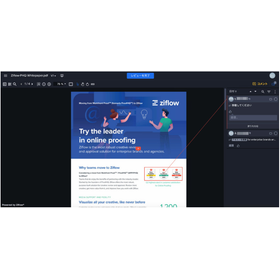
"Ziflow" is an online proofing tool that streamlines the review and approval process for various types of productions. With a simple and user-friendly interface, it offers essential features for proofing tasks, such as version control, difference checking, and collaboration. Additionally, it allows for detailed workflow and folder design, enabling a smooth transition to online and automated business processes. [Features] ■ Centralizes comments on productions online ■ Supports various file formats including flyers, catalogs, brochures, videos, and websites ■ Designs and automates circulation flows ■ Checks progress in real-time ■ Invites an unlimited number of proofreaders ■ Unlimited storage allows for archiving completed proofs ■ Reference checklists for decision-making during proofreading *For more details, please refer to the related links or feel free to contact us.
Added to bookmarks
Bookmarks listBookmark has been removed
Bookmarks listYou can't add any more bookmarks
By registering as a member, you can increase the number of bookmarks you can save and organize them with labels.
Free membership registration
"Enfocus PitStop" is a PDF editing and preflight tool that allows for easy inspection and correction of a wide range of PDFs. It offers various manual editing tools and features to validate the details of PDFs, making it effective for checking problematic PDFs. Additionally, when there is a need to check PDFs for purposes such as web publication or printing, the preflight feature allows for a one-click check of the entire PDF. 【Features】 ■ Excellent manual editing tools ■ Action feature to execute corrections with one click ■ Preflight feature to perform checks with one click *For more details, please refer to the related links or feel free to contact us.
Added to bookmarks
Bookmarks listBookmark has been removed
Bookmarks listYou can't add any more bookmarks
By registering as a member, you can increase the number of bookmarks you can save and organize them with labels.
Free membership registration
"Ziflow" is an online proofing tool that streamlines the review and approval process for various types of productions. It features a simple and user-friendly interface, while also providing essential functions for proofing tasks such as version control, difference checking, and collaboration. Additionally, it allows for detailed workflow and folder design, enabling a smooth transition to online and automated business processes. [Features] ■ Invite as many proofreaders as needed ■ Automate the circulation flow ■ Check progress in real-time ■ Communicate remotely ■ Unlimited storage for archiving completed proofs *For more details, please refer to the related links or feel free to contact us.
Added to bookmarks
Bookmarks listBookmark has been removed
Bookmarks listYou can't add any more bookmarks
By registering as a member, you can increase the number of bookmarks you can save and organize them with labels.
Free membership registration
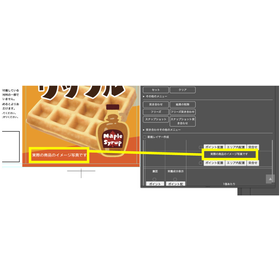
"Sowaos σ (Sigma)" is a layout creation and proofreading support extension that operates within Illustrator. It features text flow from Excel manuscripts, simple proofreading, and PDF export functions, helping to prevent common copy-and-paste mistakes that occur during design and improving work efficiency. Additionally, it allows for the output of proofreading content in PDF/HTML format, and it can be smoothly integrated with a UI/UX design similar to other panels in Illustrator. 【Features】 ■ Import Excel manuscripts / One-click comparison check ■ Work within the Illustrator panel ■ Save and check the state after layout modifications (freeze function) ■ Custom development tailored to needs is possible *For more details, please refer to the related links or feel free to contact us.
Added to bookmarks
Bookmarks listBookmark has been removed
Bookmarks listYou can't add any more bookmarks
By registering as a member, you can increase the number of bookmarks you can save and organize them with labels.
Free membership registration
"Collate Pro" is a document difference detection software that meets the needs of those who want to "find differences" or "confirm similarities." It particularly enhances various comparison functions and output features for comparison results. Users can easily perform comparison operations, quickly identify differences, and save clear comparison results. Additionally, it significantly reduces human errors such as overlooking changes due to assumptions and streamlines visual comparison tasks. [Benefits of Implementation] ■ Cost reduction through labor savings ■ Easy operation visually ■ Improved accuracy of comparisons *For more details, please refer to the related links or feel free to contact us.
Added to bookmarks
Bookmarks listBookmark has been removed
Bookmarks listYou can't add any more bookmarks
By registering as a member, you can increase the number of bookmarks you can save and organize them with labels.
Free membership registration
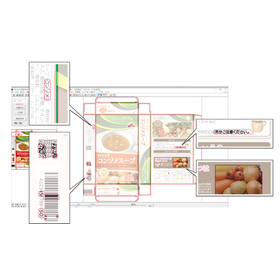
"Fault Finder Pro" is a text verification support software for package design that allows for the comparison of manuscripts and layouts. It streamlines the reading and visual confirmation of package displays, preventing display errors before they occur. Additionally, it can automatically verify even outlined or bitmap text, making it useful in various checking scenarios during product package production. 【Features】 ■ Proofreading of text manuscripts and layout data ■ Inspection possible even with different layouts and text arrangements ■ Supports layouts that are deformed into fan shapes or circles ■ Inspection results can be extracted into reports *For more details, please refer to the related links or feel free to contact us.
Added to bookmarks
Bookmarks listBookmark has been removed
Bookmarks listYou can't add any more bookmarks
By registering as a member, you can increase the number of bookmarks you can save and organize them with labels.
Free membership registration
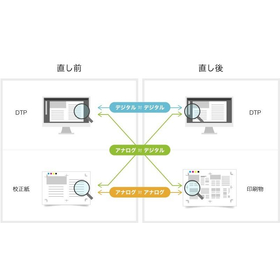
The "Hallmarker Series" is a printing comparison inspection system that enables high-precision printing inspections across various processes, regardless of whether they are digital or analog. Even with different layouts, it can automatically align and conduct inspections. Thanks to its unique image comparison engine, it has become possible to perform inspections such as "single-sided and imposition," which were difficult with conventional digital data inspections. In addition to comparing digital data with each other, it can also compare printed materials with DTP data, allowing for the inspection of issues that only appear when printed, such as smudges, dirt, scratches, water spots, pinholes, label missing, hair, text fading, chipping, and color tone defects. 【Features】 ■ High-precision printing inspections are possible across various processes, regardless of digital or analog. ■ Achieves high-precision inspections even for analog, surpassing visual inspections. ■ Simple operation. ■ Automatic alignment function. ■ Automatic distortion verification function. *For more details, please refer to the related links or feel free to contact us.
Added to bookmarks
Bookmarks listBookmark has been removed
Bookmarks listYou can't add any more bookmarks
By registering as a member, you can increase the number of bookmarks you can save and organize them with labels.
Free membership registration
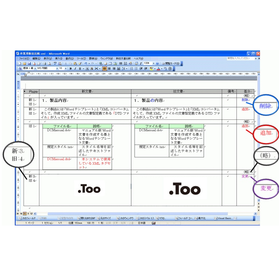
The 'New and Old Documents' is an important document revision management tool that can automatically create a comparison table showing the results of text comparisons at a glance. The Word version performs all content checks programmatically. It logically checks every line and character, accurately identifying any 'changes,' 'additions,' or 'deletions' without missing anything. The Excel version can automatically generate accurate and easy-to-read 'difference lists' and 'difference reports' with simple operations. [Features] <Word Version> ■ Easily create new and old correspondence tables ■ Significantly reduce checking tasks ■ Eliminate mistakes in document revision work ■ Extensive track record in industries handling important documents *For more details, please refer to the related links or feel free to contact us.
Added to bookmarks
Bookmarks listBookmark has been removed
Bookmarks listYou can't add any more bookmarks
By registering as a member, you can increase the number of bookmarks you can save and organize them with labels.
Free membership registration
"Sowaos" is a production support and proofreading service that prevents typographical errors and reduces checking mistakes at various stages leading up to the completion of product package design. From a range of functions tailored to different stages of package production, you can implement only the necessary features according to your needs, allowing for cost reduction. Additionally, you can rely on the service to check whether the manuscript is appropriately placed without being affected by the layout of the design PDF, thereby reducing the burden on the person in charge and minimizing checking errors. 【Features】 ■ Text comparison between Excel and PDF ■ Text comparison between PDFs ■ Image comparison between PDFs ■ Mandatory and prohibited wording checks ■ Font size check function ■ Logo and mark detection function *For more details, please refer to the related links or feel free to contact us.
Added to bookmarks
Bookmarks listBookmark has been removed
Bookmarks listYou can't add any more bookmarks
By registering as a member, you can increase the number of bookmarks you can save and organize them with labels.
Free membership registration
"TooAI SUITE" is a package check system construction service that builds a unique proofreading system for each customer. By accurately checking package displays according to customer-specific rules, the risk of display errors is reduced, and checking accuracy is improved. Additionally, with its simple operability, anyone can easily use it, and the check results allow for intuitive confirmation of error details, enabling efficient proofreading work. [Features] ■ Streamlining proofreading tasks and reducing man-hours ■ Preventing display errors and improving quality ■ User-friendly operability and intuitive error checking *For more details, please refer to the related links or feel free to contact us.
Added to bookmarks
Bookmarks listBookmark has been removed
Bookmarks listYou can't add any more bookmarks
By registering as a member, you can increase the number of bookmarks you can save and organize them with labels.
Free membership registration
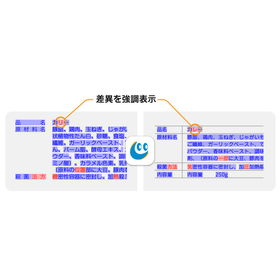
"Collate Pro" is a document difference detection software that allows for text comparison of data with different layouts. It enables comparison between manuscripts such as Word and Excel and layout data. It can compare documents with different layouts, which is impossible with just proofreading tools. Additionally, it can detect issues that arise during proofreading at the initial draft stage or when importing manuscripts into layout software. 【Features】 ■ Simple operation by just dragging and dropping files ■ Comparison results are output as annotated PDF data ■ Added, deleted, and changed text can be confirmed with color coding ■ Ability to check font size and font name ■ Allows for complex comparisons by specifying comparison locations ■ Available in both client version and on-premise server version *For more details, please refer to the PDF materials or feel free to contact us.
Added to bookmarks
Bookmarks listBookmark has been removed
Bookmarks listYou can't add any more bookmarks
By registering as a member, you can increase the number of bookmarks you can save and organize them with labels.
Free membership registration
The "Ge-DALe MK2" is a versatile automatic layout engine that broadly supports various production workflows. It is compatible with universal applications such as Adobe InDesign, Adobe Illustrator, and Microsoft Excel, and performs well on Intel Macs. It is highly functional, covering not only format layouts but also page layouts. Please feel free to contact us if you have any inquiries. 【Features】 ■ Abundant connection support ■ Customizable automatic layouts ■ Well-established ease of use and comprehensive support features ■ Performance on Intel Macs ■ Variation templates utilizing templates *For more details, please download the PDF or feel free to contact us.
Added to bookmarks
Bookmarks listBookmark has been removed
Bookmarks listYou can't add any more bookmarks
By registering as a member, you can increase the number of bookmarks you can save and organize them with labels.
Free membership registration
"Fault Finder Pro" is a package design-oriented text proofing support software that allows for digital verification of complex text corrections that you may have previously given up on. It digitizes the proofreading work that is usually done by comparing with the manuscript. You can digitally verify outlined text and inspect and proofread layout corrections. Please feel free to contact us if you have any inquiries. 【Features】 ■ Comparison of different layouts and text composition changes is possible ■ Inspection is possible even with outlined data ■ Proofreading of text manuscripts and layout data ■ Inspection can be performed while rotating items such as unfolded diagrams *For more details, please download the PDF or feel free to contact us.
Added to bookmarks
Bookmarks listBookmark has been removed
Bookmarks listYou can't add any more bookmarks
By registering as a member, you can increase the number of bookmarks you can save and organize them with labels.
Free membership registration
"Proof Checker PRO" is a digital proofreading software that significantly enhances the accuracy and efficiency of the labor-intensive proofreading process by comparing PDF files before and after editing. It not only compares images and displays differences but also enables precise data verification at an advanced typesetting level, such as "Which characters have changed?" and "How many millimeters has the object moved?" 【Features】 ■ Detailed and fast processing through data analysis in PDF format ■ Detection of changes and mistakes during modifications ■ Clear display and printing of inspection results ■ Ongoing support for new versions of PDFs that may be released in the future *For more details, please download the PDF or feel free to contact us.
Added to bookmarks
Bookmarks listBookmark has been removed
Bookmarks listYou can't add any more bookmarks
By registering as a member, you can increase the number of bookmarks you can save and organize them with labels.
Free membership registration