1~5 item / All 5 items
Displayed results

Added to bookmarks
Bookmarks listBookmark has been removed
Bookmarks listYou can't add any more bookmarks
By registering as a member, you can increase the number of bookmarks you can save and organize them with labels.
Free membership registration
Contact this company
Contact Us Online1~5 item / All 5 items
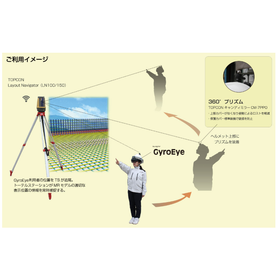
The "GyroEye TS+" is an advanced technology based on the noteworthy GyroEye that quickly converts 2D drawings into MR and projects them on-site at actual size. By collaborating with the advanced "Pile Navigation" (LN-150), which is gaining attention for its revolution in pile driving, it is possible to improve the accuracy of MR display positions. It captures the position of the HoloLens to achieve high positional accuracy. It can be used with the Microsoft HoloLens 2, which is gaining attention for its advanced MR technology, as well as with the Trimble XR10, which integrates a dedicated helmet and HoloLens 2. 【Features】 ■ Improved MR positional accuracy with GyroEye and Total Station ■ Collaboration with "Pile Navigation" LN-150 ■ Noteworthy GyroEye for MR ■ Compatible with Microsoft HoloLens 2 *For more details, please download the PDF or feel free to contact us.
Added to bookmarks
Bookmarks listBookmark has been removed
Bookmarks listYou can't add any more bookmarks
By registering as a member, you can increase the number of bookmarks you can save and organize them with labels.
Free membership registration
The "GyroEye Insert" is a newly developed application specialized in equipment insert layout, based on the well-established "GyroEye" tool for on-site digital transformation (DX) using AR/MR technology. It overlays and displays center lines, piping routes, and insert points at full scale on the site. There is no need to check paper drawings or measure by hand; you simply point to the position of the insert displayed in MR. 【Features】 <Office Side> ■ Anyone can easily prepare data ■ Significantly reduces the time required to prepare construction drawings <On-Site Side> ■ Workers do not need experience or skills ■ Productivity on-site is dramatically improved *For more details, please download the PDF or feel free to contact us.
Added to bookmarks
Bookmarks listBookmark has been removed
Bookmarks listYou can't add any more bookmarks
By registering as a member, you can increase the number of bookmarks you can save and organize them with labels.
Free membership registration
"GyroEye" is a product that projects design data in full scale into the real world, visualizing it as an integral part of reality along with the design data. Not only can 3D data from BIM/CIM be utilized, but 2D drawings can also be used, allowing anyone to quickly and easily leverage AR/MR. By utilizing digital data in AR/MR, we promote solutions for the shortage of skilled labor, improve productivity, and drive work style reform. [Features] ■ AR/MR data conversion is easier and faster ■ Viewer projection accuracy and stability have improved ■ GUI has been revamped for easy operation on-site *For more details, please download the PDF or feel free to contact us.
Added to bookmarks
Bookmarks listBookmark has been removed
Bookmarks listYou can't add any more bookmarks
By registering as a member, you can increase the number of bookmarks you can save and organize them with labels.
Free membership registration
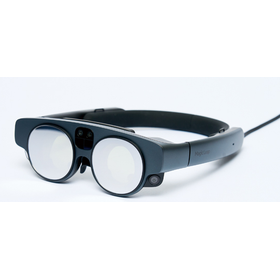
GyroEye is a package software that displays CAD drawings, 3D models, and BIM/CIM data in AR/MR. The devices supported include Apple iPad/iPhone, Magic Leap 2, Microsoft HoloLens 2, and Trimble XR10. It allows for the overlay of 1:1 real-scale drawings and 3D data onto the real world through each device. AR/MR displays can be shown in full size or in scaled-down model sizes. AR/MR models can be freely adjusted and placed in any location. It provides a portable and wireless hybrid display of drawings and models, accommodating a wide range of applications from interference analysis and construction verification to layout checks and maintenance.
Added to bookmarks
Bookmarks listBookmark has been removed
Bookmarks listYou can't add any more bookmarks
By registering as a member, you can increase the number of bookmarks you can save and organize them with labels.
Free membership registration
"If it's 'Piranesi 5', you can do it in 30 minutes." 00 minutes: Convert model data created in various 3D CADs into Piranesi's EPix file and load it. 15 minutes: Using Piranesi's lock feature, you can paint intuitively without masking operations, ensuring you don't go outside the selected area. 25 minutes: Place details such as trees, plants, and people. The size of the details automatically adjusts to the depth. Details placed further back will be hidden by objects in the foreground. 30 minutes: Easy! Create variations. Emphasizing the main subject and appropriately omitting the surroundings makes the perspective image more powerful. Challenge yourself with original expressions!
Added to bookmarks
Bookmarks listBookmark has been removed
Bookmarks listYou can't add any more bookmarks
By registering as a member, you can increase the number of bookmarks you can save and organize them with labels.
Free membership registration