Editing software Product List and Ranking from 41 Manufacturers, Suppliers and Companies

Last Updated: Aggregation Period:Oct 29, 2025~Nov 25, 2025
This ranking is based on the number of page views on our site.

Editing software Manufacturer, Suppliers and Company Rankings

Last Updated: Aggregation Period:Oct 29, 2025~Nov 25, 2025
This ranking is based on the number of page views on our site.

  1. 花商店 Hyogo//Information and Communications
  2. アコースティックフィールド Tokyo//others
  3. スカイコム Tokyo//others
  4. 4 セイビ堂 Tokyo//Building materials, supplies and fixtures manufacturers
  5. 5 ダッド Aichi//Information and Communications

Editing software Product ranking

Last Updated: Aggregation Period:Oct 29, 2025~Nov 25, 2025
This ranking is based on the number of page views on our site.

  1. Construction Photo Editing Software "Construction Photo Explorer" 花商店
  2. CEDAR Retouch アコースティックフィールド
  3. Unicorn Media セイビ堂
  4. 4 SkyPDF Standard 8 スカイコム
  5. 5 SkyPDF Professional 8 スカイコム

Editing software Product List

46~60 item / All 77 items

Displayed results

Essential points for utilizing 3D meshes.

[For Beginners] Introducing reasons why automatic surface generation is necessary and the features of automatic surfaces!

Many companies that regularly handle CAD data may have questions such as, "What processes are necessary when using 3D meshes?" In this article, we will introduce points related to their utilization. If you are considering incorporating 3D mesh into your operations, please use this as a reference. [Contents] ■ Examples of 3D mesh utilization ■ Reasons why automatic surface generation is necessary ■ Features of automatic surfaces *You can view the detailed content of the blog through the related links. For more information, please feel free to contact us.

  • Scientific Calculation and Simulation Software
  • Architectural CAD
  • Other Software

Added to bookmarks

Bookmarks list

Bookmark has been removed

Bookmarks list

You can't add any more bookmarks

By registering as a member, you can increase the number of bookmarks you can save and organize them with labels.

Free membership registration

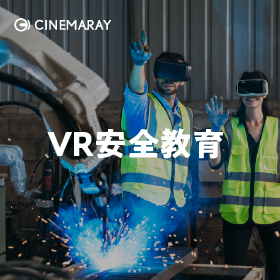
Safety Education and Technical Education VR

Protecting employees from danger with a VR safety education program! Comprehensive support tailored to various needs.

"Safety Education and Technical Education VR" is a program that utilizes VR technology to provide experiential learning related to safety, resulting in significant educational benefits. Participants can realistically experience scenarios in VR, deeply imprinting the content as personal, while reducing costs related to travel and logistics for both instructors and participants. In addition to VR, we offer a comprehensive training plan for effective safety education. [Features] ■ Effective learning through simulated accident experiences ■ Centralized management and playback ■ Confirmation of routes to the site and surrounding conditions *For more details, please refer to the PDF materials or feel free to contact us.

  • VR/AR

Added to bookmarks

Bookmarks list

Bookmark has been removed

Bookmarks list

You can't add any more bookmarks

By registering as a member, you can increase the number of bookmarks you can save and organize them with labels.

Free membership registration

VR software development "SORASOFT"

We will build by customizing our own 3D software or existing 3D engine software.

Our company customizes unique 3D software and existing 3D engine software (such as Unity3D and UNREAL ENGINE) to build and sell various 3D systems. The main clients for our 3D systems include public sector organizations (related to tsunamis and disaster prevention, etc.) and private sector organizations (utilizing VR glasses and urban landscapes), which are adopted in industries such as construction, real estate, and entertainment. 【Features】 ■ By providing a 3D system optimized for photorealistic 3D maps, we build a 3D system that can operate not only on desktop PCs and laptops but also on tablets and smartphones. ■ As special needs required for 3D systems, two elements have emerged: "VR glasses terminal compatibility (virtual experience type)" and "AR (augmented reality) compatibility," allowing us to release new products for various customers. *For more details, please feel free to contact us.

  • VR/AR
  • Video Production

Added to bookmarks

Bookmarks list

Bookmark has been removed

Bookmarks list

You can't add any more bookmarks

By registering as a member, you can increase the number of bookmarks you can save and organize them with labels.

Free membership registration

360° Video Simultaneous Playback System 'idogaVR ALLSTART'

A 360° VR solution that allows you to easily show 360° VR videos to up to 380 people simultaneously.

"idogaVR ALLSTART" is a system that allows multiple people to view 360° VR videos simultaneously, enabling synchronized play and pause operations. In the past, experiencing 360° videos required individual operation of HMDs, but with this system, up to 380 people can watch the same video at the same time. 【Features】 ■ Displays whether the PC and devices are communicating properly with color coding ■ Shows the video being viewed by the participant as an expanded display on the PC ■ Battery level display is also possible ■ Suitable for "event use" over several days or "permanent installation" ■ Allows for separate playback for different groups *For more details, please download the PDF or feel free to contact us.

  • VR/AR
  • Video Editing
  • Video Production

Added to bookmarks

Bookmarks list

Bookmark has been removed

Bookmarks list

You can't add any more bookmarks

By registering as a member, you can increase the number of bookmarks you can save and organize them with labels.

Free membership registration

A set of tools for more efficient utilization of "3D data."

Contributing to the 3D transformation of production environment management in the manufacturing industry and the utilization of 3D data in the construction and civil engineering sectors.

Our company develops and provides various tools to utilize 3D data more efficiently. In the manufacturing industry, we address various needs in design, analysis, and production environment management. In the architecture and civil engineering sectors, we contribute to the utilization of 3D data through BIM/CIM and i-Construction. This is a solution that supports operations in a business metaverse environment where 3D models and point cloud data coexist in a virtual reality space. 【Product Lineup】 ■ Scanning app available on smartphones and tablets ■ Handy scanner that is easy to view on a large screen and allows for on-site data editing ■ Tools that enable the use of 3D data even in telework environments by realizing a metaverse space ■ Tools that accommodate inspection and editing of diverse 3D data for manufacturing, civil engineering, universities, and research institutions *For more details, please refer to the materials. Feel free to contact us with any inquiries.

  • Project management tools

Added to bookmarks

Bookmarks list

Bookmark has been removed

Bookmarks list

You can't add any more bookmarks

By registering as a member, you can increase the number of bookmarks you can save and organize them with labels.

Free membership registration

[Information] Points to Keep in Mind for Video Editing That Beginners Can Practice!

To improve the quality of videos, planning and smooth communication are essential.

This document explains the necessary elements for in-house video editing. It provides detailed information on the points and challenges of video editing. An increasing number of companies are using business videos to enhance information transmission rates through marketing activities, recruitment publicity, study sessions, and exhibitions. [Contents] ■ The rise of in-house video editing ■ Key points of video editing (material aspect) ■ Key points of video editing (environment aspect) ■ Key points of video editing (skills aspect) ■ Challenges in video editing ■ Video editing tool "VideoBRAIN" that requires no materials, environment, or editing skills ■ Easily achieving in-house video editing *For more details, please refer to the PDF document or feel free to contact us.

  • Other services and technologies
  • Video Production

Added to bookmarks

Bookmarks list

Bookmark has been removed

Bookmarks list

You can't add any more bookmarks

By registering as a member, you can increase the number of bookmarks you can save and organize them with labels.

Free membership registration

Interactive video technology "TIG"

Next-generation video technology liberated from the stress of "video → search."

"TIG" is a next-generation interactive video technology that allows users to intuitively obtain information without verbalizing what they want, enabling them to reach the necessary information without confusion. We have developed an in-house tracking system that can tag videos with high precision, independent of changes in the appearance of the subject or background. By combining tracking mode and semi-auto mode, we enable overwhelming efficiency in tagging videos. 【Service Lineup】 ■ SaaS Model - A model that allows you to use a CMS for managing the upload of videos or information you want to TIG and for TIG editing in a SaaS format. - Usable via URL or iframe. ■ Enterprise Model - A licensing model for providing SDKs and plugins for implementing TIG technology into your applications or web pages, as well as for building and customizing video distribution environments and various technical extensions. *For more details, please download the PDF or feel free to contact us.

  • Video streaming services

Added to bookmarks

Bookmarks list

Bookmark has been removed

Bookmarks list

You can't add any more bookmarks

By registering as a member, you can increase the number of bookmarks you can save and organize them with labels.

Free membership registration

AR creation and editing software 'Misterine Studio/APP'

Creating AR is much easier than you might imagine! You can also create AR content with us.

"Misterine Studio/APP" is an AR creation and editing software for businesses. "Misterine Studio" allows you to easily create AR content in three steps if you have a 3D model. We can also create AR content for you. Additionally, "Misterine APP" is an AR playback application that lets you enjoy the created AR content anytime and anywhere, as long as you have a mobile device such as a tablet or smartphone. 【Features】 <Misterine Studio> ■ Easily create AR content in three steps if you have a 3D model. <Misterine APP> ■ Enjoy the created AR content anytime and anywhere. ■ Two modes are available: "Touch Mode" without markers and "Marker Mode" using AR markers. *For more details, please refer to the PDF document or feel free to contact us.

  • Video Editing

Added to bookmarks

Bookmarks list

Bookmark has been removed

Bookmarks list

You can't add any more bookmarks

By registering as a member, you can increase the number of bookmarks you can save and organize them with labels.

Free membership registration

Smart Construction Pointworks

No installation required! Easily edit point clouds from anywhere using a web browser.

"Smart Construction Pointworks" is a product that allows you to easily edit point cloud data, such as removing unnecessary objects, storing data, and checking cross-sectional shapes, all through a web browser without the need to install anything on your device. When point cloud data contains unwanted buildings or machinery, you can delete specific areas, and if there are gaps in the necessary areas of the point cloud data, it can be filled in. Additionally, if the point cloud data created by laser scanners becomes too dense and the data size is too large, you can reduce the data size by thinning out the point cloud data. 【Features】 ■ Removal of unnecessary point cloud data ■ Filling in point cloud data ■ Thinning of point clouds ■ Checking cross-sectional shapes *For more details, please refer to the PDF materials or feel free to contact us.

  • Process Control System
  • Other civil engineering services

Added to bookmarks

Bookmarks list

Bookmark has been removed

Bookmarks list

You can't add any more bookmarks

By registering as a member, you can increase the number of bookmarks you can save and organize them with labels.

Free membership registration

Master Video Editing with PowerPoint!

With the PowerPoint available now, you can acquire the video editing skills you need right away!

This is a unique course that allows many employees to utilize PowerPoint, which is essential for creating materials, to acquire the must-have video editing skills for business and create even more engaging slideshows, achieving two goals with one course! We flexibly accommodate individual requests for content adjustments and time changes based on the knowledge base of participants and various circumstances of companies. The instructor is an expert who has achieved over 500,000 total views on YouTube solely from PowerPoint editing videos.

  • Employee training

Added to bookmarks

Bookmarks list

Bookmark has been removed

Bookmarks list

You can't add any more bookmarks

By registering as a member, you can increase the number of bookmarks you can save and organize them with labels.

Free membership registration

Ready

Let's have Ready do that task. One-click jet cut.

We offer "Ready," provided by a team of creators and artificial intelligence researchers. "Ready" is not about eliminating work completely, but rather serves as a secretary-like presence that maximizes your creativity. To get started, simply download the ZXP file and drag and drop it into the ZXP installer. Select a clip that contains silent sections, and with just one click in "Ready," your work is done. [Features] ■ Can be set up in one minute ■ No manual required ■ Rich features and high accuracy *For more details, please feel free to contact us.

  • Other Software

Added to bookmarks

Bookmarks list

Bookmark has been removed

Bookmarks list

You can't add any more bookmarks

By registering as a member, you can increase the number of bookmarks you can save and organize them with labels.

Free membership registration

Construction Photo Editing Software "Construction Photo Explorer"

The folder becomes construction photos just like that! By simply sorting photos into a folder on Windows, the construction photos are completed!

"Construction Photo Explorer" is a new type of construction photo editing software. Simply sorting photos into folders on Windows completes the construction photos. The Windows folder itself serves as the construction photo, allowing for division of labor even with those who do not use this product. The display switch for thumbnail images is also completely flexible. 【Features】 ■ Smooth and comfortable photo viewing ■ Focused on "reducing effort" ■ Easy for everyone to collaborate ■ Explaining to craftsmen with photos ■ Extremely comfortable "bundling photos" 【Output Formats】 ・Photo album printing ・Catalog printing ・Cover printing ・PDF output ・HTML output ・Excel output *For more details, please refer to the PDF document or feel free to contact us.

  • Construction and process management software

Added to bookmarks

Bookmarks list

Bookmark has been removed

Bookmarks list

You can't add any more bookmarks

By registering as a member, you can increase the number of bookmarks you can save and organize them with labels.

Free membership registration

For sequential numbers and barcode printing! PDF submission solution

With a variety of processing options for submission PDFs, it can be converted into a format that is easy to handle in-house!

The main use of Inspire Designer is to create PDFs from CSV or text files, but it can also accept PDFs as input. This allows for the addition of management serial numbers, barcodes, and other elements to the submitted PDFs. It is possible to import and merge multiple PDFs, as well as sort them based on different criteria. Furthermore, it can read text from PDFs for various processing tasks, and it allows for moving or deleting text and images. PDFs submitted to printing companies are often not designed with reuse in mind. By processing them with Inspire Designer, they can be modified to be more user-friendly for various companies. Additionally, the internal structure is transformed to be suitable for RIP, not just the appearance.

  • 加工前.png
  • 加工後.jpg
  • Image_Editor.png
  • Other Software

Added to bookmarks

Bookmarks list

Bookmark has been removed

Bookmarks list

You can't add any more bookmarks

By registering as a member, you can increase the number of bookmarks you can save and organize them with labels.

Free membership registration

PDF editing software "PicoPDF" <Business Edition>

Edit PDFs with simple operations! You can edit without uploading documents to the internet, making it safe.

"PicoPDF" is an easy-to-use PDF editing software that allows you to create, edit, and sign PDF files effortlessly. You can insert images into documents. It is easy and quick to insert images exactly where you want them in the document, and resizing or moving images is also a breeze. Additionally, with this product, you can insert signatures into various PDF documents such as contracts and invoices. 【Features】 ■ Anyone can easily and quickly edit PDFs ■ Text and images can be replaced ■ Easy insertion of electronic signatures ■ New text and images can be inserted into PDFs ■ Start editing immediately after downloading *For more details, please refer to the related links or feel free to contact us.

  • Company:B7
  • Price:Other
  • Other Software

Added to bookmarks

Bookmarks list

Bookmark has been removed

Bookmarks list

You can't add any more bookmarks

By registering as a member, you can increase the number of bookmarks you can save and organize them with labels.

Free membership registration

Image editing software "PhotoPad Master Edition"

Display photos like paintings with oil painting tools! You can also insert text and draw!

"PhotoPad Master Edition" is software that allows you to edit and modify photos. It offers a wealth of convenient features, including image cutting and pasting, adding effects like mosaics, and more. You can create composite photos by cutting out parts of images, convert color photos to black and white or sepia, and change photos to an antique style. Please feel free to contact us if you have any inquiries. 【Features】 - Create composite photos by cutting out parts of images - Convert color photos to black and white or sepia - Change photos to an antique style - Hide parts of photos with mosaics or "blur" - Enhance the beauty of people with red-eye correction and retouching *For more details, please refer to the related links or feel free to contact us.

  • Company:B7
  • Price:Other
  • Other Software

Added to bookmarks

Bookmarks list

Bookmark has been removed

Bookmarks list

You can't add any more bookmarks

By registering as a member, you can increase the number of bookmarks you can save and organize them with labels.

Free membership registration