soft(3dcg) - List of Manufacturers, Suppliers, Companies and Products | IPROS

Last Updated: Aggregation Period:Jan 28, 2026~Feb 24, 2026
This ranking is based on the number of page views on our site.

soft Product List

1~22 item / All 22 items

Displayed results

Software "Next Contents Manager"

The content created so far comes back to life in AR! It can be used for promotions and events, etc.

"Next Contents Manager" is software that allows for the visual management of content (3DCG, videos, images, audio) and enables the entire process from AR conversion to publication. It automatically generates AR files, allowing for immediate publication of AR content right after uploading. Additionally, it allows for simple editing such as breaking down 3DCG into parts and coloring them, as well as creating simple models using squares and circles. 【Function Details】 ■ AR conversion and display ■ 3D model viewer ■ Content management and viewer ■ Rendering ■ File conversion *For more details, please download the PDF or feel free to contact us.

  • VR/AR
  • Other Software
  • soft

Added to bookmarks

Bookmarks list

Bookmark has been removed

Bookmarks list

You can't add any more bookmarks

By registering as a member, you can increase the number of bookmarks you can save and organize them with labels.

Free membership registration

You can actually see 3DCG created by SMART3D in AR display.

It is possible to display 3D models in places like your home to expand your imagination! We can also convert products into 3D data and provide them in formats tailored to your needs.

By simply scanning the AR QR code with your smartphone or similar device, you can virtually place products in real-world spaces like your home. You can freely manipulate the 3D model, moving the product's position and placing it at various angles in 360°. By simulating before purchase, it is possible to enhance the user's image of what it will be like after the purchase. VISUS&co. leads a team with the latest CG technology and expertise to propose plans tailored to clients' needs, enhancing the value of corporate brands, products, and services using digital solutions. You can also check the actual 3D data from the PDF below.

  • Other services and technologies
  • soft

Added to bookmarks

Bookmarks list

Bookmark has been removed

Bookmarks list

You can't add any more bookmarks

By registering as a member, you can increase the number of bookmarks you can save and organize them with labels.

Free membership registration

3DViewer VR software

It is a VR software that allows you to move freely within a 3D CG space.

This is a VR software that allows free movement within a 3D CG space. The central areas of designated cities across the country are displayed with existing buildings textured. By placing planned buildings and structures within this space, it becomes possible to simulate the landscape after the plan is implemented. Changes in shadows can be expressed within the software. Additionally, it allows for unlimited extraction of still images. A video export function can also be configured. 3D model data of people, cars, and vegetation can be added and arranged within the space. It is software that customers can easily use for landscape consideration.

  • others
  • soft

Added to bookmarks

Bookmarks list

Bookmark has been removed

Bookmarks list

You can't add any more bookmarks

By registering as a member, you can increase the number of bookmarks you can save and organize them with labels.

Free membership registration

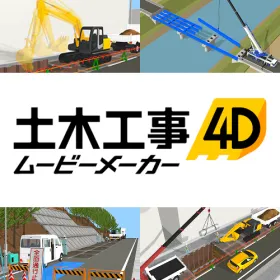
Civil Engineering 4D Movie Maker

Using point cloud and CAD data, we create 3DCG and videos to convey construction procedures in a one-stop service. Easy 3D construction videos for anyone!

This software allows you to quickly create construction step videos to confirm and share the construction process with simple operations. By importing point cloud and CAD data, you can freely create roads, rapidly reproduce the site in 3DCG, and create videos by setting movements and operation times for each component. Additionally, since the 3DCG allows for flexible viewpoint settings, it enables sharing of images for designers, construction personnel, and general users who will utilize the completed facilities at various timings and situations, significantly reducing discrepancies in understanding and the effort required for explanations, thus serving as a tool to smoothly advance the project! ● Main Features <Floor Plan Editing Screen> Import construction drawings, CAD editing, create 3D drawings, print, PDF output, image output, and 3D representation of floor plans. <3D Editing Screen> Import terrain and buildings, place 3D parts (over 5,000 recorded 3D materials), set textures and colors, create structures (3D modeling function), switch between day, evening, and night (setting spatial images based on time), lighting settings, image output, movie output (camera and viewpoint position adjustments, preview playback, video output, combining videos and images, etc.) *Support is available for free and can be used as many times as needed.

  • Civil Engineering CAD
  • Architectural Design Software
  • soft

Added to bookmarks

Bookmarks list

Bookmark has been removed

Bookmarks list

You can't add any more bookmarks

By registering as a member, you can increase the number of bookmarks you can save and organize them with labels.

Free membership registration

What is photogrammetry?

What is photogrammetry? A clear explanation of the latest information.

In recent years, photogrammetry has gained attention as a new method in 3DCG. This time, a company that is actually engaged in photogrammetry generation will explain the latest information in an easy-to-understand manner. "What's Photogrammetry? A Clear Explanation of the Latest Information" column can be found here: https://www.digi-c.co.jp/useful/column/20241219 [Sample videos are also available] For details on the photogrammetry service, visit here: https://www.digi-c.co.jp/service/photogrammetry/

  • Video streaming services
  • soft

Added to bookmarks

Bookmarks list

Bookmark has been removed

Bookmarks list

You can't add any more bookmarks

By registering as a member, you can increase the number of bookmarks you can save and organize them with labels.

Free membership registration

Software "Auto3D v1.1"

The operation is just copy and paste! It's a 3DCG software that can be used "easily."

"Auto3D v1.1" is software that can read dimensions from design unfold diagrams and calculate the width, height, and depth of packages to determine their three-dimensional shape. It allows for easy operation by simply "copying and pasting" design data into the submission folder. It strongly supports the creation of sales and promotional materials as well as design proposals. 【Features】 ■ Operation is just copy and paste ■ Desired images are completed in 30 seconds ■ Dramatically reduces the time (duration) needed to create and obtain product images ■ Improves the quality of images for product and display proposals, increases variations ■ Responds to a wide variety of client-specific requests with a single action (Image sets for Distribution Company A, Image sets for Mail Order Company B, etc.) *For more details, please download the PDF or feel free to contact us.

  • Architectural Design Software
  • Other Software
  • soft

Added to bookmarks

Bookmarks list

Bookmark has been removed

Bookmarks list

You can't add any more bookmarks

By registering as a member, you can increase the number of bookmarks you can save and organize them with labels.

Free membership registration

"SMART3D" allows for easy 3D modeling of products.

We promote sales through digital marketing utilizing 3DCG! 3D data/CG solutions that can be used on e-commerce sites and websites.

A team of about 1,200 members quickly creates and provides 3D representations of large and complex products. We can build a system tailored to our clients, capable of producing tens of thousands of 3D data sets each month. On our web pages and e-commerce sites, products can be viewed from various angles in 360°, and with AR (augmented reality) technology, users can conduct installation simulations at home through their smartphones or tablets. By confirming products in 3D in advance, we can alleviate user concerns and facilitate purchases. 【Three Key Points】 ■ 3D conversion of existing e-commerce sites is possible, and we can establish workflows that cater to our clients' web marketing needs. ■ A team specialized in modeling quickly and beautifully creates 3D representations, allowing us to build a production system tailored to our clients, even for large quantities of products. ■ With years of experience in CG content production in the manufacturing industry and the comprehensive capabilities of SMARTGROUP, we support digital marketing from planning to execution. *For more details, please refer to the related links or feel free to contact us.

  • Other Software
  • soft

Added to bookmarks

Bookmarks list

Bookmark has been removed

Bookmarks list

You can't add any more bookmarks

By registering as a member, you can increase the number of bookmarks you can save and organize them with labels.

Free membership registration

Basic Knowledge of "3D Models" - How Can They Be Used Outside of Creative Fields?

This book explains everything from the basics to actual use cases, such as "digital twins" and "digital archives," which synchronize with the target object and perform real-time analysis!

"3D models" have been utilized in creative fields such as games and animation (3DCG) as well as in engineering fields like design and manufacturing (3DCAD). However, due to recent advancements in modeling software, improvements in hardware performance for processing 3D models, and the proliferation of VR and AR, they have begun to be used in various other fields. [Overview of Basic Knowledge Materials] ■ What is a 3D model ■ Formats and characteristics of 3D models ■ The process of 3D modeling ■ Advantages and use cases of 3D models ■ List of equipment used ■ FAQ *For more details, please download the PDF or contact us directly.

  • Drawing, tracing, CAD
  • soft

Added to bookmarks

Bookmarks list

Bookmark has been removed

Bookmarks list

You can't add any more bookmarks

By registering as a member, you can increase the number of bookmarks you can save and organize them with labels.

Free membership registration

A solution unique to the Varjo XR-4!!

Professional-grade HMD "XR-4" exclusive solution! ~Standard support for pure domestic VR software moage~

The professional-grade top-tier HMD "Varjo XR-4" features unique capabilities not found in other HMDs, and its application in new VR development and research is highly anticipated. By utilizing distinctive features such as chroma keying, masking, eye tracking, and occlusion, it achieves a seamless integration of the real world and 3DCG space while maintaining consistency in distance and size. The VR-specific software "moage" is designed to standardly support these functions, enabling content creation tailored to customer needs. *The Varjo XR-4 is an ultra-high-resolution VR/MR headset developed by the Finland-based company Varjo under the slogan "Achieving human eye-level resolution." *Moage is a purely domestically developed VR-specific software created by Solid Ray Research Institute, providing total support from the construction of VR spaces to the experience.

Added to bookmarks

Bookmarks list

Bookmark has been removed

Bookmarks list

You can't add any more bookmarks

By registering as a member, you can increase the number of bookmarks you can save and organize them with labels.

Free membership registration

Twinmotion2021

High-quality presentations are possible with Unreal Engine-based 3DCG real-time rendering software.

This is a real-time VR immersive visualization software based on Unreal Engine, designed for industries such as architecture, interior design, construction, urban planning, and landscaping. With an overwhelmingly user-friendly interface that allows for easy drag-and-drop of realistic and rich materials, final rendering is reflected in real-time, enabling editing while confirming what is displayed, which significantly accelerates productivity. It supports various presentations, from up to 4K still images to 360° VR immersion. It is compatible with BIM software, including SketchUp, and supports Windows and Mac operating systems.

  • Other Software
  • soft

Added to bookmarks

Bookmarks list

Bookmark has been removed

Bookmarks list

You can't add any more bookmarks

By registering as a member, you can increase the number of bookmarks you can save and organize them with labels.

Free membership registration

Interactive video "Tap Talk"

Touching the floor! Interactive video system "Tap Talk"

Tap Talk is an impactful visual system that responds to people and objects with images projected onto floors and walls. Product Features: - As it is developed in-house, we can offer a wide variety of proposals tailored to customer needs. - We accommodate everything from permanent installations in facilities to short-term rentals for events. - By using 3D CG models, we can create diverse spatial presentations that express three-dimensionality and depth. - We perform physical calculations and numerical simulations to realistically depict water ripples and the movement of balls. - We handle everything in-house, from development and sales to installation and after-sales service. For the introduction video, click here: https://www.youtube.com/watch?v=7GcLD4LwRPI For more details, please contact us.

  • Audio and video equipment
  • soft

Added to bookmarks

Bookmarks list

Bookmark has been removed

Bookmarks list

You can't add any more bookmarks

By registering as a member, you can increase the number of bookmarks you can save and organize them with labels.

Free membership registration

Introducing BIM for reskilling to build a long-term career.

Introducing a case study of the implementation of architectural BIM "Archicad" at Life Jam Co., Ltd. We are currently offering a collection of case studies featuring numerous implementation examples.

We will introduce a case study on the implementation of BIM for reskilling to build a long-term career at Life Jam Co., Ltd. First-Class Architect Office. The company introduced "Archicad" in December 2019. Considering the Ministry of Land, Infrastructure, Transport and Tourism's promotion of BIM and the future career advancement of those involved in design, they decided to implement BIM, believing that BIM skills would become essential. After the introduction of BIM, they have achieved further operational efficiency and have also secured contracts for large-scale projects that they could not participate in before. [Case Overview] - After the introduction of BIM, the time and cost for creating proposal documents were significantly reduced. - Clarifying the roles of each staff member improved performance, and business collaboration became smoother, akin to passing a baton. - A seamless workflow from perspective creation to detailed design was realized. - As floor plans were drawn, 3D models were simultaneously created, allowing for a cohesive mental image of the building and facilitating information sharing. *For more details, please download the PDF or feel free to contact us.

  • ライフジャム2.png
  • ライフジャム3.png
  • ライフジャム4.png
  • ライフジャム5.png
  • ライフジャム6.png
  • Architectural CAD
  • Architectural Design Software
  • soft

Added to bookmarks

Bookmarks list

Bookmark has been removed

Bookmarks list

You can't add any more bookmarks

By registering as a member, you can increase the number of bookmarks you can save and organize them with labels.

Free membership registration

3D Office Designer PRO10

Office layout and simulation software

This is a 3D software that includes a large number of 3D materials such as textures for rooms, fixtures, furniture, and interior materials, allowing users to consider and propose the layout and interior design of an entire office in 3DCG with a simple operation of "placing with a mouse." It features 14,000 3D materials and new functions, including wood-grain and natural-style office furniture, trendy office kitchens, partitions, furniture, greenery (plants), digital signage, and disinfectants. It can express and propose "modern offices" that resemble cozy living spaces, coworking spaces, online meeting areas, and telework spaces at home, as well as measures against infectious diseases. Offered at a price range that is easy for companies to adopt multiple licenses, it is suitable for office furniture vendors and sales representatives from domestic and international furniture manufacturers. Since it is sold outright, there are no running costs, and users can access support for free as many times as needed, providing peace of mind. This product can also be used as a standard tool within companies.

  • Office furniture
  • soft

Added to bookmarks

Bookmarks list

Bookmark has been removed

Bookmarks list

You can't add any more bookmarks

By registering as a member, you can increase the number of bookmarks you can save and organize them with labels.

Free membership registration

Software for the manufacturing industry 【PDM Collection】

CAD + CAE + CAM + data management software = PDM Collection! Significant cost reduction with a one-package solution for the manufacturing industry!

The Autodesk PDM Collection (Product Design & Manufacturing Collection) includes all the essential Autodesk solutions for the manufacturing industry, such as 2D CAD, 3D CAD, CAE, CAM, and data management software. ◆Benefits of Using the PDM Collection - Access to the iconic 2D CAD software, AutoCAD, along with specialized toolsets for mechanical design, electrical design, architectural design, etc. (AutoCAD Mechanical/Electrical/Architecture…) - Implementation of 3D CAD leveraging design assets from 2D CAD drawings (DWG) - Reduction of lead time, minimization of rework, and improvement of quality through designer-led CAE execution - Centralized data management for simplified revision control - Strengthened interdepartmental collaboration through unified tools

  • CAD for building facilities
  • Drawing, tracing, CAD
  • soft

Added to bookmarks

Bookmarks list

Bookmark has been removed

Bookmarks list

You can't add any more bookmarks

By registering as a member, you can increase the number of bookmarks you can save and organize them with labels.

Free membership registration

Logistics Warehouse 3D

Are you still using Excel for considering the layout of warehouses and factories? Creating layout improvement plans for logistics warehouses and proposing robotic warehouses and material handling equipment.

"Logistics Warehouse 3D" allows users to create layout diagrams and 3D images without the need for specialized drafting knowledge, as it operates by arranging pre-recorded rooms and material handling equipment with a mouse, rather than "drawing lines" like CAD software. It features a flow planning function that can simulate distances and times, enabling the animation of 3D parts such as forklifts running along the flow, robotic arms turning, and workers walking. Additionally, it includes a function for numbering equipment and a color-coding display feature. The ability to accurately count the arranged equipment facilitates smooth estimation. The 3D images of warehouses created with this product can be viewed and shared not only on the operation screen but also through the following methods: - Walkthrough videos - 360-degree panoramic images (for posting on social media/web) - Yekura Cloud (3D image viewing, free app) - MegaSoft VR Solutions (separate product) - Uploading to the metaverse via GLB files By visualizing the state of racks and the latest robotic warehouses in 3D, which cannot be fully expressed through words or floor plans, it becomes immediately clear and easy to understand.

  • Drawing, tracing, CAD
  • soft

Added to bookmarks

Bookmarks list

Bookmark has been removed

Bookmarks list

You can't add any more bookmarks

By registering as a member, you can increase the number of bookmarks you can save and organize them with labels.

Free membership registration

3D Architect Designer Professional Office Pack

Office layout and simulation software that can design a single room, one floor, multi-story, and an entire office building in 3DCG.

We can create office structural drawings (floor plans), layout diagrams with office furniture and equipment arranged, high-quality 3D images of office building entrances and exterior structures, indoor and outdoor walkthrough movies, and PowerPoint presentation materials. In addition to manufacturer-made office furniture and equipment, we also include over 21,000 3D materials such as home furniture and equipment increasingly used in refresh spaces, decorative plants, flooring materials, and wallpaper textures. By simply placing these with a mouse, you can complete the image of the office space, making it accessible even to sales representatives who have not learned specialized design or CAD operations. Moreover, the furniture arrangement features aggregation and numbering functions that can be utilized for creating estimates and planning relocation documents, and it is also possible to transfer the information of the created office space to existing systems or other tools. Furthermore, the office image can be output as a 360-degree panoramic image to be shared on social media, viewed through applications like Iekuraudo (3D data sharing app) and Megasoft VR solutions (separate product), or uploaded to the metaverse via GLB files.

  • Architectural CAD
  • soft

Added to bookmarks

Bookmarks list

Bookmark has been removed

Bookmarks list

You can't add any more bookmarks

By registering as a member, you can increase the number of bookmarks you can save and organize them with labels.

Free membership registration

CG production services

We pay respect to craftsmanship and our motto is to create CG that supports the creators.

Our company is engaged in a wide range of CG production, including commercials, films, and various fields such as industry, machinery, medical, architecture, and civil engineering. We can also visualize ideas that have not yet been commercialized from design drawings, blueprints, CAD data, etc. Additionally, we handle VR, AR, projection mapping, event videos, and exhibition videos for museums. 【Features】 ■ Proposals tailored to specific applications ■ Expertise in CG compositing techniques developed through the production of commercials and films, as well as photorealistic expressions and special effects ■ Experienced staff providing CG tailored to your needs *For more details, please download the PDF or feel free to contact us.

  • Audio and video equipment
  • VR/AR
  • soft

Added to bookmarks

Bookmarks list

Bookmark has been removed

Bookmarks list

You can't add any more bookmarks

By registering as a member, you can increase the number of bookmarks you can save and organize them with labels.

Free membership registration

Fusion360 Experience Course - From Design to 3D Printing

Based on the production process of models created with a 3D printer, you will gain an understanding of an efficient modeling workflow from a new perspective.

Fusion360 is an integrated 3D CAD application that handles CAD, CAM, CAE, and rendering. Among its features, the hybrid modeling capability that supports solid, surface, polygon, and mesh modeling is based on a novel concept that sets it apart from traditional CAD products, earning high praise in the manufacturing industry. The modeling function, which seamlessly utilizes the intuitiveness of free curves and the accuracy of drawing-based methods, has garnered significant attention not only in manufacturing but also in the entertainment industry, including 3D printing, gaming, and film. In this course, you will experience the production process of models for 3D printing, allowing you to understand an efficient modeling workflow from a new perspective. Please also consider it as a comparison with your current 3D CAD products or as an idea for use alongside Maya, 3ds Max, and Zbrush. Date: Saturday, May 26, 2018, from 17:00 to 20:00 *Fusion 2018 will be used. *One computer (Windows) will be provided per person.

  • Other CAD
  • molding
  • others
  • soft

Added to bookmarks

Bookmarks list

Bookmark has been removed

Bookmarks list

You can't add any more bookmarks

By registering as a member, you can increase the number of bookmarks you can save and organize them with labels.

Free membership registration

Civil engineering and architecture specialized VR "3DViewer" *Demo software available for distribution

Freely navigate a high-quality 3DCG space. Supports the addition of objects. The data is lightweight and does not require installation.

"3DViewer" is a VR software that allows users to freely navigate through a 3D CG space created based on high-quality 3D map data. In addition to being able to set sunlight, time, and weather, it also supports the placement of objects such as vegetation, vehicles, and character models. Our company also offers the creation of 3D spatial data combined with CAD data, providing low-cost data for landscape studies, resident explanations, and urban planning. 【Features】 - No installation required. The data is lightweight and can be used on laptops. - 3D spatial data can be displayed not only on PC screens but also on VR goggles. - 3D spatial data can be saved as still images or videos. *We offer a demo software for free. Please feel free to contact us for more details. You can view the "manual" that allows you to check the features via PDF download.

  • Other Software
  • soft

Added to bookmarks

Bookmarks list

Bookmark has been removed

Bookmarks list

You can't add any more bookmarks

By registering as a member, you can increase the number of bookmarks you can save and organize them with labels.

Free membership registration

あ!動く図面 (Free版・イメージムービーあり)

~ 工程と3Dオブジェクトモデルの連動。時間の経過で図形が変化。 ~

「あ!動く図面」は3次元モデルCADに加え、時間的な変化を与えれば”簡単な動画が作成できる” 新しいタイプの3次元CADです。 ”時間的な変化”といっても操作は簡単です。 3DCADで作成したオブジェクトを、時間(工程)にドラッグ&ドロップで対応付けることができます。それに動きのパラメータを設定すれば、あとは再生ボタンを押すだけ。簡単に動画を作成することができます。 対応付けの操作等は工程表を用いているので、とてもわかりやすくなっています。

  • Drawing, tracing, CAD
  • Architectural CAD
  • Civil Engineering CAD
  • soft

Added to bookmarks

Bookmarks list

Bookmark has been removed

Bookmarks list

You can't add any more bookmarks

By registering as a member, you can increase the number of bookmarks you can save and organize them with labels.

Free membership registration

Textile Design Software 4Dbox PLANS

It is software that allows for easy simulation of knits from general textiles with simple operations.

For many years, we have responded to the requests of numerous users by continuously improving the interface, enhancing functionality, and updating the OS compatibility to pursue greater efficiency in design work. If realistic representation of materials takes too much time, requires significant investment, or is difficult to operate, the effectiveness will be limited. 4DboxPLANS will continue to meet the needs of designers. 【Features】 - Operates with a feel similar to Photoshop, eliminating the need for specialized operators. - Supports the loading of PSD files (with conditions). - Compatible with Macintosh and Windows OS. - There are no restrictions on the number of PCs that can be installed per contract. - A variety of package plans and subscriptions are available to suit different needs. - Can be used as a texture for 3DCG (with conditions). If you have any questions regarding the product, please feel free to contact us.

Added to bookmarks

Bookmarks list

Bookmark has been removed

Bookmarks list

You can't add any more bookmarks

By registering as a member, you can increase the number of bookmarks you can save and organize them with labels.

Free membership registration

Fusion360 Experience Course - From Creating Mechanical Parts to Assembly

By modeling parts and creating assemblies, you will be able to experience the design flow using Fusion 360.

Fusion360 is an integrated 3D CAD application that handles CAD, CAM, CAE, and rendering. Among its features, the hybrid modeling capability that supports solid, surface, polygon, and mesh modeling is based on innovative ideas that set it apart from traditional CAD products, earning high praise across various industries. Not only does it offer innovation, but it also includes traditional mechanical 3D CAD functionalities, allowing for advanced mechanical design, including individual part design, product assembly creation, and sheet metal functions, despite its price. In this seminar, participants will experience the design flow using Fusion360 by modeling parts and creating assemblies. It is recommended for those considering the active adoption of 3D CAD, those who have hesitated due to cost, and those looking to reduce the operational costs of existing 3D CAD systems. Date: Saturday, May 26, 2018, from 13:30 to 16:30 *Fusion360 2018 will be used. *One computer (Windows) will be provided per person.

  • Architectural CAD
  • Residential CAD
  • Scientific Calculation and Simulation Software
  • soft

Added to bookmarks

Bookmarks list

Bookmark has been removed

Bookmarks list

You can't add any more bookmarks

By registering as a member, you can increase the number of bookmarks you can save and organize them with labels.

Free membership registration